12/Documentation
Tricks
How tricks work: where a trick can show, the two kinds, the parts, three examples, where the thinking comes from, who is trusted with what, adding and switching a trick, tricks in a crew, and troubleshooting
A trick adds its own parts to ColliePWA on your phone: a count, a question, or a whole screen.
Tricks are experimental. They may change, lose settings, or be withdrawn in a patch release. They are off until you switch them on in Settings → Tricks and the Hill, or with collie tricks on. See Switch tricks on or off.
Collie is a web app for your phone. It lets you watch and answer the AI coding agents that run in the terminals of your computer. A trick extends Collie. It is a folder on your computer: a small program, or rules for an agent, or both. What it shows on the phone is drawn by Collie, in Collie's own look.
This page explains how tricks work, in the order of the animated page How tricks work. Every place, part, manifest key, limit and command is listed once, in the Tricks reference. To write a trick, read Write a trick.
What a trick is
A trick is a folder that Collie runs or hands to an agent, and the phone draws what comes back.
Tricks need no cloud service from Collie. The phone talks to your own machine. Five paths carry everything:
- The phone talks only to the bridge, Collie's own program on your machine, over your private network.
- The bridge runs a trick's program and reads the data it prints.
- The bridge types a line into an agent session: a terminal pane where an agent such as Claude Code works.
- An agent runs a
colliecommand in its own pane, and the bridge knows which pane asked. - You tap on the phone. Every yes on this page is a tap of yours.
Where a trick can show
A trick can show in eight places on the phone, and nowhere else. It can also post to the Hill.
A place is a spot on the phone where a trick can show (a surface). Collie owns every place. A trick names the places it wants in its manifest, and its parts appear there, drawn by the phone with Collie's own look.
- Seven places take a program's parts. On the Dashboard: a tile in the strip at the top, a row under Tricks that opens the trick's own Page, and an item in the bottom bar. In an agent session: a chip at the left end of the status line, a mark at the end of the Belt, and rows in the session's settings. The seventh,
float, is a small moving picture over the app: it plays once (once) or stays on screen (stay), on the Dashboard or in the sessions the part names. It stays in the free area of the screen, never covers a question and never blocks a tap. A picture that rests on an edge can open the trick's Page, when its part says so. A picture is a file in the trick'smedia/folder, drawn by Collie from a fixed list of motions. Use original art, never a known character. "Moving pictures from tricks" in Settings → Look and feel turns every picture off on a device, and each trick keeps its own switch. - The agent view is the eighth. It is a view of one agent session, beside Terminal and Chat, and that session's own agent draws it.
- The Hill is not a place, it ships with Collie. It is the page of questions that wait for you, and an experiment: off until you switch it on in Settings → Tricks and the Hill. A trick posts a question there, a Decision, and does not list the Hill in its
places.
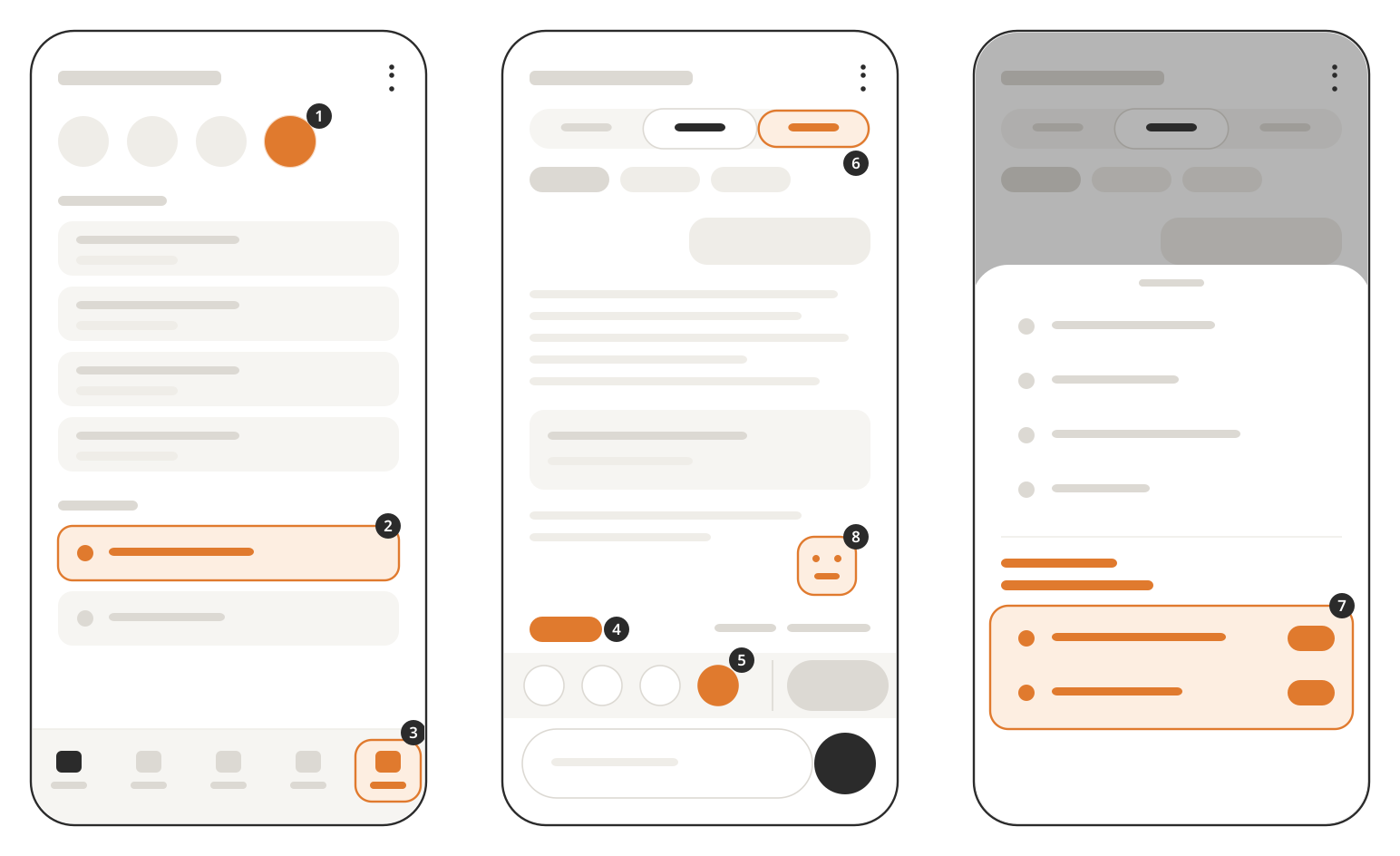
In the picture, on the Dashboard: 1 the tile, 2 the row of the trick's Page, 3 the bottom bar item. In a session: 4 the status chip, 5 the mark on the Belt, 6 the agent view beside Terminal and Chat. In the session's settings: 7 the trick's rows. Over a session: 8 a floating picture.
The Places section of the reference describes each place: where it shows, what it takes, what a tap does, its limits and an example.
A tile, an item and a chip are not buttons. A tap on one opens the trick's Page, when the trick has one. A mark on the Belt can run the trick when you tap it. A button on a Page runs the trick's program once, with your tap.
A part for a place that this Collie does not know is left out, with a note, and the other parts still show. So a trick written for a newer Collie still works on an older one.
Session settings rows
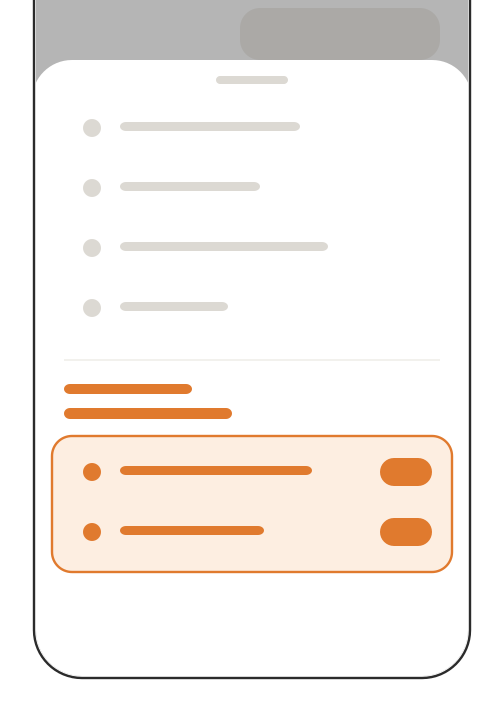
A trick can add rows to the settings of an agent session, the sheet that opens from the session's ⋮ button. Its rows come after Collie's own rows and Close, in a group of their own under "From the trick", then the trick's name. A row is a button or a switch.
- A tap runs the trick and tells it which session. Collie gives it no way to type there.
- A switch shows what the trick last said. It does not flip when you tap it: it waits, with a spinner, until the trick answers.
- A row with a confirm asks for a second tap and shows its whole label.
- The rows stay as they were when the sheet opened. A row the trick adds shows the next time.
- A line under the group says when the trick does not answer, refuses, or is switched off.
The switch of an agent view is in its trick's group too. A trick can also bind a row, or a mark on the Belt, to some sessions only. See Session settings rows in the reference.
Note. A part that is out of date shows without its colour. A trick tells Collie how long its parts stay fresh. After that time the phone shows them as old, and says how old.
Two kinds of trick
A trick is a program that prints parts, or rules for an agent that draws a screen.
- A program trick is a small program on your machine. The bridge runs it on a timer, or when you tap. It prints what to show, and Collie draws it in its seven places and on the Hill. Its folder holds
trick.tomland the program. - An agent view is rules for the agent of one session. The agent answers you by drawing one screen, in that session's agent view. Its folder holds
trick.tomlandrules.md, and no program.
Both are a trick: one folder under ~/.config/collie/tricks/, added and switched on the same way, with the same parts to draw with. One trick can also be both: a program for its places, and a view.
The parts
A trick sends parts, not code. So a screen can be made for one moment and still be Collie's.
Every trick draws with the same parts: a row, a number, a chip, a button, a diff, and a few more. A part is a small piece of data that names what to show. The phone has one drawing for each.
That makes just-in-time UI possible: a screen made for one situation, at the moment it comes up, and gone after. Nobody designed it in advance. A program or an agent put it together from what it knew right then.
{ "kind": "button", "attrs": { "label": "Fix both" } }What makes this safe is the form it takes. The agent does not send code or HTML. It sends data, in a closed list of parts. The bridge refuses any part that is not on the list, and Collie's own renderer draws the rest. So a screen can be new every time, and still look and behave like Collie.
A kind outside the list is never drawn, and neither is a kind only Collie draws, such as its own questions or its reply box. A trick or an agent can choose what to show. Only Collie decides how it looks. The Parts section of the reference lists all 22 kinds.
One button reaches the reply box. With does set to draft, a tap on a trick's page puts the button's text into the reply box of the session you opened the page from, and opens that session. It fills only an empty box and never sends: you read the text and tap Send. The trick asks for it with drafts = "session" in trick.toml, and its card says so before you switch it on (button).
Example 1: a program trick
A trick prints data. The phone draws it with Collie's own parts.
It uses two places, the Dashboard tile and the status chip, and two parts, an item and a chip.
trick.toml, the manifest:
id = "disk-space"
name = "Disk space"
run = "./program.sh"
every = "5m"
icon = "archive"
places = ["dashboard", "status"]
description = "Room left in your home folder."program.sh, the program:
#!/bin/sh
# Disk space: how much room is left in your home folder.
cat > /dev/null   # the facts on stdin; this trick needs none
kb=$(df -Pk "$HOME" | awk 'NR==2 {print $4}')
gb=$((kb / 1048576))
tone=plain
[ "$gb" -lt 10 ] && tone=warn
tile='{"icon":"archive","label":"Disk","badge":"'$gb' GB","tone":"'$tone'"}'
chip='{"icon":"archive","text":"'$gb' GB free","tone":"'$tone'"}'
echo '{"v":1,"fresh":"15m","parts":['
echo ' {"at":"dashboard","id":"dashboard","item":'"$tile"'},'
echo ' {"at":"status","id":"status","chip":'"$chip"'}]}'
One run goes like this:
- The bridge's timer fires, five minutes after the last run. It runs a trick on a timer only while a phone is looking.
- The bridge starts
program.shon your machine and hands it the facts on stdin: your sessions, your spaces, why it runs. - The program prints one JSON document and exits. It has 10 seconds and 64 KiB.
- The bridge reads the document against Collie's closed list of places and parts. Anything it does not know is left out, with a note.
- The phone draws a tile and a chip with Collie's own parts. No code from the trick reaches the phone.
A trick can be this small, or it can be bigger. Real ones list your open pull requests, or the builds that run in your sessions now. They all work the same way: a program prints data, and Collie draws it.
Example 2: a trick that asks
A trick can ask you a question, and your answer goes back to its program.
It uses the Hill, and the parts bar, chip, list and row on the card.
The Hill is the page of questions that wait for your tap. Each card is one Decision: one question with its choices. A made-up trick, Release gates, posts one when a gate is red before a release. It lists the Decision in what it prints:
{
  "decisions": [{
    "key": "tag-1-28-2",
    "title": "Tag 1.28.2 with the e2e gate red?",
    "summary": "Six of the seven gates are green. The e2e gate failed once.",
    "options": [
      { "intent": "rerun", "label": "Rerun e2e first" },
      { "intent": "tag", "label": "Tag it now", "confirm": "Tag now" }
    ],
    "recommends": { "intent": "rerun", "why": "It failed on a timing budget." }
  }]
}- The bridge runs the trick's program on its timer, and hands it the facts.
- The program prints its parts, and a list of the questions it wants open. Each has its own key.
- The bridge posts a new key to the Hill once, with the trick as the sender. The next run with the same key posts nothing again.
- The phone shows the card on the Hill. The recommended option carries a star, and nothing is chosen for you.
- You tap "Rerun e2e first".
- The bridge closes the card and runs the program once more, with your answer as a tap.
- The program starts the rerun. The card's receipt says that the trick took your answer.
The program reads your answer on stdin, in fields of Collie's. seen names the version of the card you answered, so a program that changed it since can tell:
{ "kind": "tap", "node": "hill/tag-1-28-2", "intent": "rerun",
  "value": { "text": null }, "rid": "0b9e8d7c-…", "seen": "944a71314b332828" }
A key the program stops listing is taken back from the Hill. A changed card replaces the open one. When the program fails, the last good cards stay.
An agent can post a Decision too, with collie hill post. Its answer is then typed into its session as a short message from you. A trick's Decision can name a session too: your answer then reaches that session as your own message, and then the program.
Note. A permission needs a person's tap. A trick cannot answer a Decision, press a key or type into a session for you. And a recommendation you did not read never becomes the answer by default.
The Hill covers the page itself, and the reference lists every key of a Decision.
Example 3: Morph, an agent view
Morph lets the session's own agent answer you with one screen instead of a wall of text.
It uses the agent view, and the parts list, row, diff, bar, button, number and para.
Morph is an agent view: a trick with no program, only rules. It adds a third view to a session, beside the terminal and Chat. You switch it on for one session, and ask in plain words. The agent of that session answers by drawing one screen: a list, a diff, two buttons. You tap, and the agent gets a short line it can act on.
- You type a request in the Morph view of a session: "Which tests broke after the rename?"
- The bridge types it into that session, after a head that Collie writes and nobody else can.
- The agent reads the rules once, then says what it does. The view shows its note.
- The agent writes the screen as data, with a
collie trick viewcommand. The bridge checks it against the list of parts. - The phone draws the screen with Collie's own parts, under Collie's band.
- You tap "Fix both". Collie marks your pick.
- The bridge writes the line from the screen it stored, and types it into the session. The view shows you the exact line.
- The agent does the work and answers with a new screen.
This is what reaches the agent when you send the request. It is one line:
[view:morph lodge/w54:p1B#sx56] from operator: Which tests broke after the rename?
[rules: /home/you/.local/bin/collie trick view morph help --session lodge/w54:p1B#sx56]
The agent draws with two commands:
collie trick view morph start --session lodge/w54:p1B#sx56 --rules 3f9a07c2 \
  "Reading the test output"
collie trick view morph show --session lodge/w54:p1B#sx56 screen.json
A tap on "Fix both" sends this line:
[view:morph lodge/w54:p1B#sx56] from operator: tapped "Fix both"The head is Collie's. The words in quotes are the button's own label, which the agent wrote when it drew the screen. The bridge quotes it from the screen it stored. A button has no hidden value: every word a tap sends is on the screen.
A view does not send in three moments:
- A question waits. The agent asks a question in this session. The buttons wait, and what you type answers the question.
- The agent works. A turn runs. The buttons wait until it ends. Nothing queues.
- Drawn in an earlier conversation. The session started a new conversation. The screen is old, and its buttons are off.
A tap sends only words you saw on the screen, on one line, and the view then shows you that line. Once a tap went, that screen takes no second tap. The screen belongs to one session and one conversation: when the conversation changes, the screen turns old and its buttons stop.
The band at the top is Collie's. It names the trick and says who drew the screen, and the agent cannot draw over it. Collie draws every button itself, so an agent cannot make a button that looks like one of Collie's own questions.
Where the thinking comes from
Collie holds no model key and calls no model.
- Disk space: nowhere. A shell program reads a number and prints it. No model is involved at all.
- Release gates: nowhere. Its program reads the gates and asks on the Hill. You do the deciding, and the program acts on your answer.
- Morph: in the session's own agent. The agent thinks once per screen, inside the session you already run. Collie only checks and draws the result.
- An agent's Decision: in the agent that asked. It wrote the question and its advice in its own turn. The card and your tap need no model.
The thinking comes from the agent you already run: Claude Code, Codex or another, on your own plan or your own key. Collie only carries words between you and that session. The phone and the bridge have no model in them.
A trick's program can call a model if its author makes it do so. That is the author's choice, and it runs as you. Before you switch a trick on, Collie's check warns you when its code seems to call an agent or a model on a timer.
How an agent learns the rules
Every word your agent gets from Collie is text you can read.
An agent only knows what it reads. Collie gets its rules to an agent in three ways. A skill is a short instruction file that an agent such as Claude Code or Codex reads when a task calls for it.
- The WalkyTalky and Hill rules. Collie writes one skill into each agent's own instruction files, after each update, or when you run
collie skill sync. Every agent on the machine knows them. - How to write a trick, and what one installed trick asks of an agent. The agent runs
collie trick guide, orcollie trick skill <id>, and reads what it prints. Only an agent that asks for it gets these words. - The rules of a view, such as Morph. They are a plain text file,
rules.md, in the trick's folder. The agent runs the command named at the end of a message that your tap sent from the view. Only a session where you switched the view on gets them.
The message head has three parts. The head itself is Collie's: it names the view and this session's own address, and no other door may type it. Then come your words, or the words of the button you tapped. Last is the command that prints the rules. It goes away once the agent proves it holds them, by the rules id the help gives it.
A view's rules are never installed as a skill. The third way is their only way in. They are plain visible characters: Collie refuses an invisible or direction character in them. The trick's About sheet in Settings shows them raw and whole, byte for byte what the agent gets, before you switch the trick on.
A new version with changed rules always asks you again, with the change shown in full. It is never taken without asking.
Who is trusted with what
A trick runs as you. Your tap is the only yes.
A trick's program runs on your machine, as your user, with your files and your logins. Collie cannot fence it in. So Collie does what it can do well: it checks everything the trick hands back, it keeps every yes for you, and it tells you plainly what it found in the code.
- Collie checks the manifest and every part against the closed list, holds each run to 10 seconds and 64 KiB, runs only the code you said yes to, and searches the code for six risky things.
- Your tap decides Add, and the switch: a trick is off until you switch it on. It also decides each new version, each Decision and each view.
- Your job is to judge the code: read it, or ask a session to read it for you. The yes does not wait for that. It is a hold of 1.5 seconds, so that it is never a stray tap.
Official and community tricks
Official tricks come from Collie's own repository, https://github.com/AltanS/collie-tricks. Each release names the exact version of each one, and Add fetches that version and nothing else. They arrive switched off, like every trick.
Community tricks are anyone else's. You find them on the website, under the GitHub topic colliepwa-tricks. The app never fetches a list of them. You add one by its address, and its row says "ColliePWA did not check this code."
Collie does not check a trick's code, official or community. Read it before you switch it on.
Add a trick
collie trick add
collie trick add design-review
collie trick add https://github.com/owner/repo//folder#v1
With no name, add lists the official tricks and adds nothing. A name means that folder of the official repository. Any other https git repository takes an address, then optionally // and a folder, and # and a branch, a tag or a full 40-digit commit. An address with a user name or a password is refused, and so is any address that is not https.
On the phone, Settings → Tricks and the Hill shows one list of tricks. The official tricks come first, in the order of the release's list, then your other tricks by name. Each row says Official or Community. An official trick you have not added shows an Add button in its place. A tap makes one git fetch, then checks the hash of what arrived. The added trick stays in the same place, with its switch. Adding a trick or switching it changes its row, never its place. The Hill is not a row of that card: it is not a trick, and its switch is on the same page, in the card The Hill.
Add from a repository that lists its tricks
A repository can list its tricks in a collie-tricks.json file at its top (Several tricks in one repository). Then:
collie trick add https://github.com/owner/tricksprints each folder, its name and its one line, and the commit it read. It adds nothing. Add one with collie trick add https://github.com/owner/tricks//<folder>. A repository with no such file and no trick.toml at its top says so and names the //<folder> form.
On the phone, the list in Settings → Tricks and the Hill ends with "Add a trick from a repository". Paste the https link, tap "Read the list", then tap Add on one trick. The list shows the repository's own words under "The repository says". They are a claim, not a check: the trick's own trick.toml wins once it is added. Add makes one git fetch, checks the folder as collie trick add does, and the trick arrives switched off. Its switch then asks you, as for every trick. A repository's list never makes a trick Official.
The phone reads only from github.com, gitlab.com and codeberg.org, over https, with no user name or password in the link. For any other host, add the trick at the terminal with collie trick add <url>, which also uses your own git settings. The phone's fetch reads none of your git settings, follows no redirect, and runs one at a time. The row is disabled while tricks are switched off, and collie trick add <url> fetches nothing then, with or without a folder. The limits are in the reference.
add copies the trick into tricks/ in Collie's config folder. That folder is ~/.config/collie on a binary install, and Herdr's plugin config folder on a Herdr-managed install (Configure). It prints the commit it copied and the same warnings as collie trick check. The trick stays off.
Nothing from the repository runs when you add it. Collie reads the files from git's own objects and writes each regular file itself. It refuses a symbolic link or a submodule anywhere in the trick's folder. It leaves out dot files, dot folders and node_modules/, because they are outside the code you approve. The size caps are in the reference.
Every verb of collie trick is in the reference.
Switch tricks on or off
collie tricks on
collie tricks off
collie tricks status
Tricks as a whole have one switch for each machine, and it is off until you switch it on. On the phone it is the Tricks card at the top of Settings → Tricks and the Hill, above the card for the Hill. The page always shows the switch. While the switch is on, it also shows the list of your tricks. While it is off, the list is gone. The switch holds for the machine, on every phone at once. A trick's program runs as you on this machine.
While tricks are off, no trick runs and none draws a part, in any place. No agent view opens, and no trick asks on the Hill. A Decision that a trick asked before stays open but hidden, and it is back when tricks are on again. collie trick add, collie trick update and collie trick propose answer that tricks are off and where to switch them on. collie trick list still lists your tricks, so you can read each one before you switch.
Each trick keeps its own switch. Tricks on does not switch on any trick, and tricks off does not switch any trick off: a trick that was on runs again once tricks are on. On a Windows machine the switch stays off (Collie on Windows).
In a crew, tricks run on the lead, so the lead's switch is the one that counts. A crew member with no switch of its own follows its lead. Switch tricks off on the member itself to stop it answering the lead.
Switch a trick on, off, or remove it
collie trick on design-review
collie trick off design-review
collie trick remove design-review
A trick runs only while it is on. Switch it on in Settings → Tricks and the Hill, or with collie trick on in a shell. Switching on is your yes to the code as it is now. Collie copies the code to a folder of its own and runs that copy. The row, and collie trick on, list any warnings from a text search of the code first. The search reads every file the run line names, whatever its name, and warns about code the run line hands over that it could not read.
Switching off stops the runs and removes the trick's parts from the phone. It withdraws the trick's open Decisions too.
To remove a trick, switch it off first. Then open its details page from Settings → Tricks and the Hill, tap Remove trick in the Remove section at the end of the page, and confirm. The button needs a device with write access. Or run collie trick remove <name> in a shell. Both delete the trick's folder, its saved settings, its approved code and any copy waiting for your yes from that machine, and they drop its agent views and the Hill's record of it. You cannot undo it. While the trick is on, the section says "Switch the trick off to remove it." and the command says to run collie trick off <name> first. While a run of the trick is still going, both refuse; try again in a few seconds. A folder of the trick that is a link, or lies outside the tricks folder, is left alone and nothing is removed. A trick of a crew member is removed on that member.
A trick with a timer runs only while a paired phone is looking. Collie counts a phone as looking for five minutes after its last request. A trick that calls a paid service every 30 seconds makes no call while the phone is in your pocket.
An agent does not approve its own trick. collie trick on, collie trick auto <id> on and collie tricks on refuse in a pane where an agent works, and say so. They refuse too in a pane that Collie cannot confirm is a shell, for example when no bridge answers. Run them in a shell pane or in a terminal of your own. The check is a speed bump, not a lock. Your user account is the real boundary (An agent does not pair a device).
A new version of a trick
Collie runs the approved copy. When you edit the trick's folder, or collie trick update fetches new code, the trick keeps running the old version. Its row says "A new version waits for your yes."
A card asks "Use the new version of <name>?". It is on the Hill, and in Settings → Tricks and the Hill under Waiting for your yes, where the trick's row opens it too, with the Hill on or off. It shows the files that changed and any new power the version asks for. You have three options:
- Hold to use approves the code on the card, and the trick runs it. Keep a finger on it for three seconds; with a keyboard, press it twice.
- Hold to use and stop asking does the same, and switches on "Update this trick without asking". It is offered only when the version asks for no new power.
- Keep the old version declines it. Collie does not offer that version again.
Switching the trick on again, or collie trick on <id>, approves the new version as well.
Your yes starts the new version at once. The trick does not wait for its every time, and the phone draws what the new version prints within a second or two, with no reload. The same holds after you switch a trick on or change a setting. An edit of config.toml by hand runs the trick as soon as Collie sees it, within a few seconds while a phone is open. A run that is going finishes first, and its output is dropped. Two runs of one trick never overlap. A version that waits for your yes changes nothing: the old approved copy keeps running.
"Update this trick without asking" is a switch on the trick's details page, under Updates. The command is collie trick auto <id> on. With it on, a new version is taken without a card only when its powers did not change and a text search of its code finds no new kind of warning. A trick with rules never takes one this way. A trick that took a change shows when, with Undo, which brings back the version before.
Powers, the environment and the warnings
A trick cannot type for you, cannot put code on your phone, and asks only through the Hill. At most, a button can put a text into your empty reply box, and you send it yourself. Past that, it can do what you can do.
Powers. A power is something a trick may reach beyond its own code: the environment names it asks for (env), the places it draws in (places), the files it reads from your agent sessions (inputs), and whether its buttons may put text into your reply box (drafts). The details page lists them. A new version that changes one always asks you again. The menu place is a power like any other place, and a Belt mark that names sessions only shows in fewer sessions, so it needs no new yes. Collie's own text also calls a power a right.
The environment. A program gets only the variables a shell tool needs, such as PATH and HOME. A trick lists any more by name, and the details page shows each name. Collie never passes a COLLIE_ or HERDR_ variable, or any name that ends in _SOCK or _SOCKET, even when a trick lists it.
The warnings. Before you switch a trick on, Collie searches its code for six things: calling an agent or a model on a timer, using Collie's local API socket without its helper, reaching the network, starting another program, writing a file outside the trick's own state folder, and importing a package Collie does not install. The search is not a proof. A program can do any of this in a way no pattern sees.
After a failed run Collie waits 1 minute, then 5, then 30, and then stops the trick. A new version, a change to config.toml, switching it on again, or a tap starts it again.
Caution. A trick is not in a sandbox. It can do what you can do on your machine. Collie's check is a text search, and code can hide what it does from any search. An agent that read a view's rules keeps them until its conversation ends, even after you switch the view off. Your taps protect you from a stranger and from an agent that follows the rules. Your user account is the real wall (What a program running as you can still do).
The details page
The details page is what you read before you switch a trick on. Tap the trick's name in Settings → Tricks and the Hill to open it, or the info button at the end of the header on the trick's own page. Back returns to where you came from.
- The top holds the trick's icon, its name, its labels and its switch, with the state in words. An official trick has the app's blue on its label and its icon tile. A community trick stays grey. The header of the page says Trick details, and the trick's name is the page's heading.
- About holds the trick's one-line description and its longer text, then "Written by the trick's author. Collie did not check it."
- What it does holds only facts Collie knows: "It shows in: ...", the files it reads, the environment names it asks for, the warnings of the text search, and a view's rules, shown whole. A warning's icon takes the caution colour of a flagged line of code, and its words stay as they are.
- This trick's settings holds the values the trick asks you for, in one bordered group with one row each, when its
trick.tomllists[[field]](Settings a trick asks you for). A change saves at once and runs the trick once. It asks for no new yes. While a required setting is empty, the trick's row says "Needs setup". A list of places or several names reads as plain words in the row. A short value such as a duration, a file name or a version keeps its small box. - Where it comes from says "From owner/repo @ 3f2a91c" for a trick added from a repository, or "Added on this machine." A trick from a repository has a link to it, with the host shown in full. For a repository on
github.com, the link also shows its stars and the date of its last commit, once Collie has read them. The version shows when the trick's author wrote one intrick.toml. - Updates holds the "Update this trick without asking" switch, for a trick that is on and gives agents no instructions. A trick with rules or an agent view never takes a change without asking.
- Read the code holds one fold for each file of the trick's code, with the lines of the text search marked. The code is the approved copy, the one that runs, with keys masked. When the code cannot be read, or changed while it was read, the page says "Go back and open this page again."
- Remove is the last section. It deletes the trick from this machine (Switch a trick on, off, or remove it).
The description and the longer text are the author's own words, and nothing checks them against the code. Read the rows under "What it does" first.
Write your own
Four commands, and your agent can write one with you.
collie trick init disk-space
collie trick dev disk-space
collie trick check ~/.config/collie/tricks/disk-space
collie trick on disk-space
init makes the folder, with a starter program, and also writes the notes an agent needs. In an agent's pane it makes the folder in the agent's own work folder instead, as a draft, and nothing is added to this machine's tricks before your yes. dev runs it once and prints what the phone would draw, and sends nothing to the phone. check searches the code for the six risky things. And on refuses in a pane where an agent works, so the yes stays yours.
Or ask one of your agents for the trick you want. It reads collie trick guide, writes the folder, tries it with collie trick dev, and then proposes it to you:
collie trick propose ~/work/disk-spaceA card appears with the whole code on it: on your Hill, or in Settings → Tricks and the Hill under Waiting for your yes while the Hill is off. Collie never recommends "Switch it on": your own judgement is the check. The yes is a hold of 1.5 seconds. Nothing of the trick runs before your yes. Collie offers an agent no way to switch a trick on. A program that runs as you can still do it.
An agent can propose a program trick. It cannot propose a trick that carries a view or rules: an agent must not write instructions for your other agents and get them in with one tap. You add such a trick by hand, or from a repository.
Write a trick walks through a whole program trick and an agent view.
Tricks in a crew
A crew's lead runs the tricks. A member runs none. Each machine has its own switch for tricks as a whole, and the lead's switch decides what runs. A member whose own switch is off reads no files for the lead's tricks; a member that never moved its switch follows the lead.
A member's Settings says "Tricks run on the lead of this crew. This machine runs none." Add a trick on the lead's machine.
On the lead, a trick sees the sessions of every machine in the crew. It can also read files from the agent sessions of every machine, if its manifest lists them. Each member decides whether to allow that, and the lead asks each member again for each read (Tricks that read files on every machine).
A trick's settings live on the lead too. A member shows them and cannot change them. They do not move to a deputy: after a takeover the trick says "Needs setup" until you set them again there.
An agent on a member machine can still put a Decision on the lead's Hill (Decisions from any machine).
Troubleshooting
Most problems show in the trick's row in Settings → Tricks and the Hill, or in collie trick list.
| What you see | What it means and what to do |
|---|---|
| "Tricks are switched off on this machine; ..." | Tricks as a whole are off. Switch them on in Settings → Tricks and the Hill, or run collie tricks on |
| "This trick cannot run. ..." | trick.toml has an error, and the rest of the line says which. Run collie trick check <folder> and fix each line it prints |
| "Part of this trick is not shown. ..." | The trick runs, but Collie refused one part of what it printed, for example a status line over its length. The rest of the line says which. Run collie trick dev <folder> to see each refusal |
| "A new version waits for your yes." | The folder moved past the approved copy. Tap the line to open its card, or run collie trick on <id> |
| "The approved copy changed on disk, so the trick stopped. ..." | A program edited the approved copy. Read the code, then switch the trick on again |
| "The approved copy holds a symbolic link, so the trick stopped. ..." | A trick holds regular files only. Replace the link, then switch it on again |
| "No version of this trick is approved yet. ..." | The switch file has no approved code for the trick. Switch it on again |
| "Stopped after repeated failures" | The program failed after 1, 5 and 30 minutes. Fix it, then switch it off and on, or tap its mark |
| "Last run failed" | The phone keeps the last good version. "Why" shows the error, and "Copy for an agent" copies it |
| "This Collie cannot draw this part" | A crew member's older Collie does not know the kind. Update Collie |
| "The Hill is off: this trick's Decisions are not shown." | Switch the Hill on in Settings → Tricks and the Hill, or run collie hill on |
| "Tricks run on the lead of this crew. This machine runs none." | You are on a member. Switch tricks on from the lead |
"Could not switch <name>. Try again." | The phone could not write the switch. Check that the device may write, and that the bridge answers |
| "error: collie trick on is a person's yes to the code, ..." | An agent ran the command. Run it in a shell pane, or tap the switch on the phone |
"a trick <id> is already in <folder>. ..." | The id is taken. Use collie trick update, or remove the old one first |
"<id> is on. Switch it off first: collie trick off <id>" | remove works only on a trick that is off |
| "This trick needs a newer Collie: ..." | The trick was written for a later Collie. Run collie update |
| "The trick is busy. Try again in a moment." | A tap came while another waited. Tap again |
| "The bridge restarted while this tap ran. ..." | Check the result, then tap again if needed |
| "A decision is answered on the Hill, not with a tap." | A Decision's card is answered on the Hill, not from the trick's Page |
A trick that runs but shows nothing on a timer may be waiting for a phone. Open the app, and give it a minute.
To find out why a trick does what it does, read it. collie trick check <folder> lists what its code starts and reaches, and collie trick dev <folder> runs it once and prints what the phone would draw (Write a trick).
Where to go next
- Tricks reference, for every place, part, key, limit and command.
- Write a trick, for the person or agent who writes one.
- The Hill, for the Decisions a trick or an agent asks you.
- Crews, for tricks that read files on every machine.
- Security, for what a program under your user can still do.