01/Documentation
Install Collie
The front door you need, then the install for your system: Linux, Arch and Omarchy, Nix, macOS, Windows, or as a Herdr plugin. Covers first run, setup on an iPhone or Android phone, updates, and uninstallation
Install Collie on your system, start it, and put it on your phone. Read Security first: Collie exposes remote shell access to your machine by design.
Before you start
Collie needs a front door: something that serves it over HTTPS and restricts access to you.
The default front door is Tailscale. collie start runs tailscale serve for you, and your phone reaches Collie over your tailnet, your private Tailscale network. The rest of this page assumes Tailscale. For an identity-aware proxy, a reverse proxy, Cloudflare Tunnel or NetBird instead, see Front doors, one product at a time.
With Tailscale, prepare three things:
- Put the host on your tailnet by installing Tailscale there and running
tailscale up. - Put the phone on the same tailnet by installing the Tailscale app and signing in to the same account.
collie start exits with an error if HTTPS is off. The phone also requires HTTPS to install Collie to the home screen and receive Web Push.
Two ways to run it
Every Collie is one of two kinds, and every command on this page is spelled once for each. Pick your column and keep it for the rest of the docs.
| Herdr plugin | Standalone | |
|---|---|---|
| You installed with | herdr plugin install AltanS/collie or herdr plugin link | The install script, a source build, or a package |
| How to tell | herdr plugin list shows herdr.collie | collie is on your PATH, or lives at ~/.local/share/collie/current/bin/collie |
| Verbs are spelled | herdr plugin action invoke <verb> --plugin herdr.collie | collie <verb> |
| Who updates it | The update action | collie update, or your package manager |
Config .env | ~/.config/herdr/plugins/config/herdr.collie/.env (herdr plugin config-dir herdr.collie prints it) | ~/.config/collie/.env, or the Herdr path on a host that runs Herdr |
| State | ~/.local/state/collie/ | ~/.local/state/collie/ |
collie doctor names the config files this install actually reads, under its config-file line.
A Herdr plugin is still the same collie binary; the actions forward to it (Herdr actions). A plugin install has no collie on your PATH, so the verbs that have no action (pair, qr, logs, link, devices, stt, config) run from the plugin's directory as bin/collie <verb>.
Herdr is also one of the five multiplexers Collie can mirror (Herdr, tmux, zellij, tuios and tern). Which one you mirror is a separate choice (Name your multiplexer): a standalone Collie can mirror Herdr, and a Herdr plugin can mirror tmux.
Requirements
Collie runs on Linux and macOS. Windows 11 on x64 with Herdr is a supported host, still marked experimental; see Windows support.
| Tool | Needed for | Purpose |
|---|---|---|
curl, tar, sha256 tool (sha256sum/shasum) | Binary install script and updates | Download and verify release archives. |
| Bun | Source builds | Run the bridge and build the web UI. |
| git | Source builds and Herdr routes | Clone and update the repository. |
| Multiplexer: Herdr, tmux, zellij, tuios or tern | All installs | Mirrored backend set via COLLIE_MUX. tmux and zellij are experimental in 1.0, and tuios and tern are experimental too; see Pointing Collie at a multiplexer and MUX_CONTRACT.md. |
| Herdr ≥ 0.7.0 | Herdr backend only | Required when COLLIE_MUX=herdr. Check with herdr --version. |
| Tailscale | The default front door | tailscale serve proxies Collie to your tailnet. Not needed behind another front door. |
Note. Collie enforces no minimum tmux or zellij version. The adapters were tested against tmux 3.4, tmux 3.6b, and zellij 0.44.2. One tmux edge case is handled: on a server usingwindow-size manual, tmux below 3.7 crashes when creating a window. Collie blocks the request and tells you to runtmux set -g window-size latest.
Soft dependencies, needed only for these features:
| Tool | Needed for |
|---|---|
| Node.js | Formats MagicDNS names in logs. |
| systemd / launchd | Service supervision; falls back to nohup. |
web-push | Optional, see Web Push. |
Install
Find your system below, run its commands, then go on to Start it.
| System | Recommended route |
|---|---|
| Linux | The install script |
| Arch Linux, Omarchy | collie-bin package |
| NixOS, or Nix on any system | Flake package |
| macOS, Apple Silicon or Intel | The install script |
| Windows 11 (x64, with Herdr) | install.ps1, experimental |
| Any of these, inside Herdr | Herdr plugin |
Linux
curl -fsSL https://colliepwa.dev/install.sh | sh
collie start
The script installs a prebuilt binary for x86_64 or arm64. Standalone explains what it does and how to pin a version.
collie start runs the bridge as a systemd --user service. It stops when you log out. On a server reached over SSH, keep it running after logout and reboots:
loginctl enable-linger $USERSee Surviving reboots for details.
Arch Linux and Omarchy
git clone https://github.com/AltanS/collie.git && cd collie/packaging/aur
makepkg -si
collie start
collie-bin is not on the AUR or in Omarchy's repository yet. Build it from this repository's PKGBUILD for now. It downloads the prebuilt binary without compiling. Once published, sudo pacman -S collie-bin (Omarchy) or paru -S collie-bin (AUR) replaces the clone.
Omarchy includes tmux and Herdr. You must name the one to mirror on the first start, for example COLLIE_MUX=herdr collie start. Arch and Omarchy under Package details cover layout, updates, and removal.
NixOS and Nix
nix profile install github:AltanS/collie#collie
collie start
This works on NixOS and any system with Nix on x86_64-linux, aarch64-linux, and aarch64-darwin. There is no NixOS module yet. Nix under Package details has the rest.
macOS
curl -fsSL https://colliepwa.dev/install.sh | sh
collie start
The published Mac binaries cover Apple Silicon (macos-arm64) and Intel (macos-x64), and require macOS 13 or newer, the minimum their Bun build links against. The Intel binary uses Bun's baseline target, so it also runs on Macs without AVX2.
collie start registers a launchd agent in ~/Library/LaunchAgents. It starts Collie at login and restarts it on failure. It also runs tailscale serve, so the tailscale command must be on your PATH. The Tailscale app for Mac can install that command from its settings.
Note. A Mac reached only over SSH has no login session for launchd. collie start reports this and runs the bridge in the background without supervision: no restart on failure, nothing at login.macOS has no package yet. mise works on a Mac, as does the aarch64-darwin Nix output.
Windows support (experimental)
Experimental. The install was tested against the public v1.16.0 release on a Windows 11 virtual machine, and the update was rehearsed against local copies of the release files. Phone access over HTTP through Tailscale Serve was run too. An update between two real releases and the HTTPS form of phone access are not tested yet. The release check requires the Windows zip from now on. Only the maintainer can override that, for a Linux hotfix. "Supported" means the maintainer owns the code and tests it; "experimental" stays until the conditions on the Windows page are all met. Collie on Windows has the whole page.
Run install.ps1. It needs no Bun, Git or bash:
irm https://colliepwa.dev/install.ps1 | iexTo read the script first, save it, open it and run it as a file:
Invoke-WebRequest -OutFile install.ps1 https://colliepwa.dev/install.ps1
notepad install.ps1
powershell -ExecutionPolicy Bypass -File .\install.ps1
Then open a new terminal and start Herdr. Herdr takes over that terminal, so open a second terminal or a Herdr pane and run collie start there. Zero to phone has every step, including how to open Collie on your phone.
What to know before you start:
- Windows 11 on x64, with Herdr only. tmux, zellij, Windows 10 and Windows on ARM are not covered.
- The binary is unsigned. SmartScreen can ask before it runs, and Smart App Control can block it. Windows page.
- You publish the address yourself. On Linux and macOS
collie startrunstailscale servefor you. On Windows it does not, so you run it by hand: Reaching it from your phone has the steps with Tailscale, and Variant C covers a reverse proxy. - A Windows machine cannot join a crew in this release.
- A build from source needs Git for Windows'
bash. The zip needs no toolchain. - A source checkout never updates itself on Windows. Moving to the zip install is a one-time manual step:
collie uninstall, theninstall.ps1. After thatcollie updateworks. Update has the detail.
Standalone
The install script downloads the latest release into ~/.local/share/collie (COLLIE_DIR) and links the binary to ~/.local/bin/collie:
curl -fsSL https://colliepwa.dev/install.sh | sh
collie start
It fetches the newest stable release and leaves an existing install untouched. To update one, use collie update. The canonical source is scripts/install.sh in the repository: one page of POSIX sh that never calls sudo. Read it before running it:
curl -fsSL https://raw.githubusercontent.com/AltanS/collie/main/scripts/install.sh | less
curl -fsSL https://raw.githubusercontent.com/AltanS/collie/main/scripts/install.sh | sh
If ~/.local/bin is not on your PATH, run the binary directly:
~/.local/share/collie/current/bin/collie versionTo pin a version or fix an existing install (see When collie will not run):
curl -fsSL https://colliepwa.dev/install.sh | COLLIE_TAG=v1.0.0 shThe script queries the GitHub API for releases, which rate-limits per IP address. If it returns HTTP 403, pin the version as shown above, or set GH_TOKEN to a token with no scopes. See If GitHub rate-limits the release check.
For prereleases, pass --beta. It selects the newest prerelease, and the install then tracks prereleases for that major version until the final release ships (Prereleases).
The same result, from source
# 1. Clone and checkout latest stable tag
git clone https://github.com/AltanS/collie.git ~/.local/share/collie
cd ~/.local/share/collie
git checkout --detach "$(git tag --list 'v*' | grep -E '^v[0-9]+\.[0-9]+\.[0-9]+$' | sort -V | tail -1)"

# 2. Build runtime and UI
bash scripts/collie-ctl.sh build

# 3. Verify
bin/collie version

# 4. Optional: link to PATH
bin/collie link
A source build requires Bun and git. Start it with bin/collie start, or collie start after linking.
Herdr plugin
herdr plugin install AltanS/collie
herdr plugin action invoke start --plugin herdr.collie
Start the Herdr server first (herdr or herdr server &). This works on Linux and macOS.
To install from a local clone instead:
git clone https://github.com/AltanS/collie.git && cd collie
herdr plugin link "$(pwd)"
herdr plugin action invoke start --plugin herdr.collie
For a prerelease, install the tag with herdr plugin install AltanS/collie --ref <tag> --yes. That is the whole opt-in (Prereleases).
From a package
A package is a standalone install managed by your package manager: it installs, updates, and removes. Commands for each manager appear above and under Package details, along with mise for Linux and macOS.
A package is not a Herdr plugin. To show Collie's buttons in Herdr, link the installed tree once:
herdr plugin link /opt/collieHerdr does not scan /opt, so it never detects the package automatically. The plugin's update and update-major actions refuse to run and refer you to your package manager. That is intentional: your package manager manages this tree.
Name your multiplexer
Collie mirrors one backend: COLLIE_MUX=herdr (default), tmux, or zellij.
You do not need to set it before the first start. start looks for a live Herdr socket, a running tmux server and zellij sessions, prints what it found, and writes your choice to the config .env, creating the file if needed.
Without a terminal prompt, start picks the single backend it found and reports it. If it finds none, or finds several, it refuses to start and tells you to set COLLIE_MUX.
To choose in advance, seed the config before your first start:
mkdir -p ~/.config/collie
cp ~/.local/share/collie/current/.env.example ~/.config/collie/.env
That path is for the install script; a source checkout has .env.example at its root. On a Herdr plugin, the file lives where herdr plugin config-dir herdr.collie points. Then set the backend and its endpoint:
COLLIE_MUX=tmux                                           # or: zellij
# zellij instead: COLLIE_MUX_ENDPOINT_ZELLIJ=<session>
COLLIE_MUX_ENDPOINT_TMUX=/run/user/1000/collie-tmux.sock
Caution. Do not run thatcpafter a start: it overwrites theCOLLIE_MUXvalue thatstartjust wrote.
Edit the file later as your setup changes. See Pointing Collie at a multiplexer.
Start it
herdr plugin action invoke start --plugin herdr.collie   # Herdr plugin
collie start                                             # standalone
start will:
- Build
web/distif missing. - Launch the bridge under
systemd --user(or launchd/nohup). - Run
tailscale serve --bg 8787(HTTPS :443 → 127.0.0.1:8787). - Print the connection banner.
First run: what you'll see
Output from collie start (Herdr runs return JSON; view logs with herdr plugin log list --plugin herdr.collie):
$ collie start
building web UI (first run)…                    # linked clone only; a GitHub install already built
…bun install · typecheck · vite build output…
bridge started (systemd --user: collie)
tailscale serve (https) → tailnet :443 -> 127.0.0.1:8787

  ✓ Collie is running  ·  v1.0.0+b158755
    service   systemd --user (collie) · active
    local     http://127.0.0.1:8787
    tailnet   https://myhost.tail1234.ts.net
If the health check fails (⚠ Collie isn't answering on :8787 yet), see Troubleshooting.
The bridge runs as a systemd --user service or macOS launchd agent. It starts at login and restarts on failure (ARCHITECTURE.md §3). On Linux, loginctl enable-linger $USER keeps it running across reboots (Surviving reboots).
Configure user access in Configure and device access via pairing (collie pair).
Is it actually working?
Verify status and logs:
$ collie status

  ✓ Collie is running  ·  v1.0.0+b158755
    service   systemd --user (collie) · active
    local     http://127.0.0.1:8787
    tailnet   https://myhost.tail1234.ts.net

  serve config:
    https://myhost.tail1234.ts.net (tailnet only)
    |-- / proxy http://127.0.0.1:8787
$ collie logs # journal timestamps trimmed here
[push] disabled (no VAPID keys configured)
[bridge] listening on http://127.0.0.1:8787 (poll 1500ms)
[bridge] WARNING: COLLIE_TRUSTED_USER is empty — any tailnet device/user that reaches the bridge is checked by its pairing token alone. Set it to your tailnet login (see README → Variant A).To restrict access, set COLLIE_TRUSTED_USER=you@example.com in .env and run collie restart (Configure). For missing dashboard content, see Troubleshooting.
Put it on your phone
Open Collie on the phone, pair the phone, and add Collie to the home screen.
- Confirm that the phone's Tailscale app shares a tailnet with the host.
- Run
collie qron the host and scan its code, or open the URL thatcollie urlprints. - Run
collie pairon the host and scan that QR code.
The QR code from collie pair opens Settings → System → Paired devices with the code entered. You can also open Settings → System → Paired devices and enter it manually. Collie answers no device until it is paired, so the dashboard shows Pair this device until then (Pair a device).
Collie is a web app. The browser adds it to your home screen without an app store, giving it a standalone icon and full-screen view.
iPhone and iPad
- Open the Collie URL in Safari.
- Tap Share, then tap Add to Home Screen.
- Tap Add.
On iOS 16.4 and newer, Chrome, Edge and Firefox also offer Add to Home Screen in their share menus. If you see Open as Web App, keep it selected.
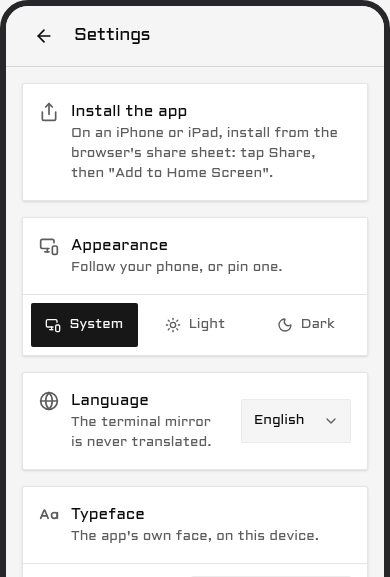
Safari does not provide an install button. Collie's Settings shows an Install card with these steps instead until you complete them.
Note. On iPhone or iPad, Web Push requires iOS 16.4 or newer and works only from the home screen icon. Open Collie from that icon, then enable notifications in Settings.
Android
- Open the Collie URL in Chrome.
- Go to Collie's Settings and tap Install on the top card.
This card appears once Chrome offers the install. If it does not appear, open Chrome's menu (⋮) and tap Add to home screen, then Install. Some Chrome builds label this Install app. Firefox and Samsung Internet use Add to Home screen in their main menus.
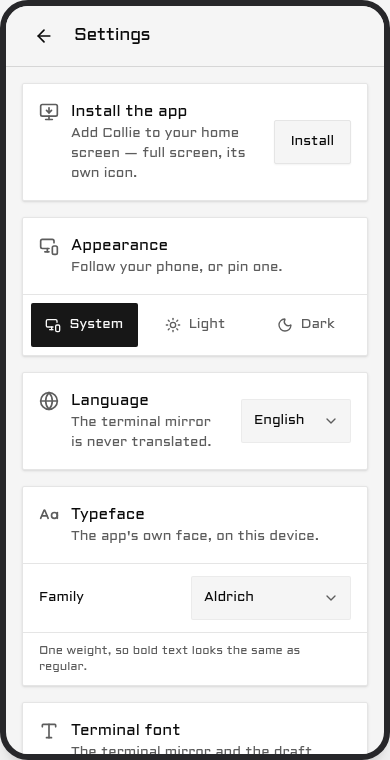
Android supports Web Push inside standard browser tabs. Installing only adds the home icon and full-screen mode.
Desktop
Chrome and Edge show an install icon in the address bar, plus the Install card in Settings. On macOS, Safari 17 and newer uses File → Add to Dock.
Notes for every device
- Installing requires HTTPS. Under
COLLIE_SERVE_MODE=http, browsers disable service workers, limiting Collie to a standard browser tab. - Dev builds (checkouts off a release tag) install as Collie (dev) with an orange icon to avoid confusing them with release versions.
- Pairing binds to a single device. Pair every phone, tablet, or browser you plan to use.
First launch
When Collie first opens on a device and loads the dashboard, an intro screen outlines your setup. It lists the active multiplexer, mirrored host, running panes, panes needing input, crew machine count, and your write access.
Below that, it suggests up to two actions: pairing the device, starting something, enabling alerts, or saving Collie to your home screen. It ends with six core tasks you can run.
The app marks this screen seen on load, so closing the tab will not show it again. You can view it later by tapping Show the first screen again in Settings.
Update
One command takes the newest release of your current major.
herdr plugin action invoke update --plugin herdr.collie   # Herdr plugin
collie update                                             # standalone
It stages the new version beside the old one, flips, restarts the bridge, and rolls back if the new version does not answer.
A packaged install updates with its package manager, and then needs a restart, because the package manager swaps the files and restarts nothing:
sudo pacman -Syu collie-bin                 # Omarchy; on the AUR: paru -S collie-bin
nix profile upgrade collie                  # Nix
mise upgrade --bump github:AltanS/collie    # mise
collie restart
collie update declines on a packaged install and names that command instead. The phone shows the same command where the update button would be.
Crossing a major is a separate, consented step:
herdr plugin action invoke update-major --plugin herdr.collie   # Herdr plugin
collie update --major                                           # standalone
The phone can do the routine update too: Settings → System → Updates, one tap, and on a crew lead one tap levels every member. For the phone path, the preflight, rollback, crews, and what to do when an update sticks, see Manage & update.
Uninstall
Three steps, in this order. Each one removes one layer and nothing else.
1. Remove the service and the port mapping. This stops the bridge, deletes the systemd --user unit (the launchd agent on macOS) and takes down Collie's own tailscale serve mapping. The program files and your .env stay.
herdr plugin action invoke uninstall --plugin herdr.collie   # Herdr plugin
collie uninstall                                             # standalone
2. Remove the program.
herdr plugin uninstall herdr.collie      # Herdr plugin, installed from GitHub
herdr plugin unlink herdr.collie         # Herdr plugin, a linked clone or a linked package

collie unlink                            # standalone: drop the ~/.local/bin/collie symlink
rm -rf ~/.local/share/collie             # standalone: the install script's tree, or $COLLIE_DIR

sudo pacman -Rns collie-bin              # package: Arch and Omarchy
nix profile remove collie                # package: Nix
mise uninstall github:AltanS/collie@1.14.2  # package: mise, the version
mise unuse github:AltanS/collie             # package: mise, the config line
A linked clone is your own checkout. unlink drops Herdr's registration and leaves the directory for you to delete or keep.
3. Remove your own files, if you want them gone. Nothing above touches these, so a reinstall finds its pairings and its settings again:
| What | Herdr plugin | Standalone |
|---|---|---|
Config, holding .env | ~/.config/herdr/plugins/config/herdr.collie/ | ~/.config/collie/, or the Herdr path on a host that runs Herdr |
State: paired devices, crew files, stt.json, folders.json | ~/.local/state/collie/ (or $COLLIE_STATE_DIR) | the same |
To pause without removing anything, stop is enough:
herdr plugin action invoke stop --plugin herdr.collie   # Herdr plugin
collie stop                                             # standalone
Package details
The PKGBUILD, the Nix expression and their notes live in packaging/ in this repository. Every package carries the compiled binary the release already publishes, so nothing is built on your machine: no Bun, no git, no compilation. The whole release folder lands under one prefix, with collie on your PATH as a symlink into it. macOS has no package yet; the aarch64-darwin flake output is the closest thing.
Arch
collie-bin is not on the AUR yet. The AUR has paused new account registration, and the package will be published from our own account when registration reopens. Until then, build it from a clone of this repository:
git clone https://github.com/AltanS/collie.git && cd collie/packaging/aur
makepkg -si
collie start
makepkg downloads the release tarball for your architecture, checks its sha256 against the release's integrity manifest, and unpacks it. No Bun, no git clone of anything else, no compilation.
Once it is on the AUR, an AUR helper installs the same PKGBUILD:
paru -S collie-bin     # or: yay -S collie-bin
collie start
Later updates are paru -S collie-bin or yay -S collie-bin, the same command you installed with. sudo pacman -Syu collie-bin works only where a repository carries the package, such as Omarchy's.
The package installs the release tree to /opt/collie and /usr/bin/collie as a symlink into it. README.md, CHANGELOG.md and docs/ land in /usr/share/doc/collie-bin/, and the licence in /usr/share/licenses/collie-bin/. It provides and conflicts with collie, so it and a future source package cannot both be installed. It enables no systemd unit: collie start writes your own --user unit, as it does after any install.
Note. Runcollie restartafter every upgrade.pacmanreplaces the files and restarts nothing, so the service keeps serving the old build on a deleted binary until you restart it.collie doctorreports it asrestart-pending, and the phone shows "Collie was replaced on disk. Restart it." with the command to run.
Remove it with the three steps under Uninstall: collie uninstall, then herdr plugin unlink herdr.collie only if you linked it, then sudo pacman -Rns collie-bin. pacman removes /opt/collie and /usr/bin/collie and nothing else.
Omarchy
sudo pacman -S collie-bin
COLLIE_MUX=herdr collie start
Omarchy ships tmux and Herdr both, and Collie mirrors one multiplexer per install, so the first start has to name the one to drive: it refuses to guess between two it can see. start writes that name into Collie's .env, which on a host with Herdr is ~/.config/herdr/plugins/config/herdr.collie/.env, and later starts are collie start.
That works once collie-bin is in Omarchy's own package repository, and the pull request adding it is not merged yet. Until it is, build the same package from packaging/aur with makepkg -si, as on any Arch host above.
Updates then come with sudo pacman -Syu, the command you already run to update the machine. An AUR helper is not involved, because pkgs.omarchy.org is a real pacman repository. It is the same PKGBUILD and the same /opt/collie layout either way.
Note. Updates come from your package manager, and Collie will not update itself here.collie updatedeclines instead. The phone's update band reads "Collie x.y.z available via pacman.", and the Updates page shows the command to copy in place of an update button, because the package manager owns that folder. Collie names thesudo pacman -Syu collie-binform, which is the repository spelling; on an AUR install run your helper instead. Runcollie restartafter the upgrade, for the reason above: pacman restarts nothing.
In a crew, this machine never takes an update from the phone: the crew lists it as "waits for the package manager", and it levels only when you run your helper on it.
Remove it with the same three steps as on Arch above.
Nix
nix profile install github:AltanS/collie#collie
collie start
The flake exports packages.<system>.collie for x86_64-linux, aarch64-linux and aarch64-darwin. It fetches that platform's release tarball by the sha256 in the release's own integrity manifest, patches the binary's interpreter on Linux, and installs the release tree to <store-path>/lib/collie with bin/collie as a symlink into it. Run it once without installing with nix run github:AltanS/collie#collie -- doctor.
There is no source build, on purpose: installing the dependencies needs the network and a Nix derivation has none, so the package wraps the binary the release already publishes and checksums.
There is no NixOS module yet, only the flake package, so nix profile is the path: install it into your profile as above, or add the flake output to a home-manager or environment.systemPackages list yourself.
Note. Updates come from nix, and Collie will not update itself here.collie updatedeclines and namesnix profile upgrade collieinstead, and the phone shows the new version with that command where the update button would be.
In a crew, this machine never takes an update from the phone: the crew lists it as "waits for the package manager", and it levels only when you run nix on it.
Remove it with collie uninstall first, then:
nix profile remove collieThat drops the store path from your profile and nothing else. Your own files stay, as listed under Uninstall.
Home Manager agents on macOS
collie status
launchctl print "user/$(id -u)/herdr.collie"
collie status discovers the instance's label in both gui/<uid> and user/<uid> and reports its domain and process state. If both domains contain the label, it reports both; a stopped GUI agent does not hide a running background agent. No environment override is needed.
For an existing Home Manager-managed Collie agent, these settings select the background domain (Home Manager 26.11 or later):
launchd.agents.collie = {
  domain = "user";
  config.Label = "herdr.collie";
};
This is an addition to your agent definition, not a complete service module. Keep its command, environment, and log paths configured in Home Manager. Run the bridge with collie _exec-bridge, not collie start, so launchd supervises the bridge without Collie rewriting the managed plist. Keep credentials and pairing state outside the Nix store. Configure the front door separately with collie serve, or use the external-proxy setup.
For a named instance, use the label herdr.collie-<name> and the same COLLIE_INSTANCE, COLLIE_PORT, and configuration directory in the agent and your CLI environment (multiple instances).
Note. Home Manager owns the service lifecycle. Update or remove its declaration and activate Home Manager rather than runningcollie start,stop,restart, oruninstall. Those commands still manage Collie's GUI-domain agent; status discovery does not transfer ownership. Continue usingcollie pair,devices,url, andlogsnormally.
mise
mise use -g github:AltanS/collie@1.14.2
collie start
mise use -g writes the tool into ~/.config/mise/config.toml and puts the release's bin/ on your PATH. The github backend fetches that platform's release tarball, so this works on Linux and macOS with no Bun and no compilation. The whole tree lands under ~/.local/share/mise/installs/github-altan-s-collie/<version>/, web/dist and herdr-plugin.toml included, and collie resolves its own root from there.
Take a new version with the same mise use line and a newer tag, or let mise pick the latest:
mise upgrade --bump github:AltanS/collie
collie restart
--bump is the flag that matters. A pinned 1.14.2 is a range of one, so a plain mise upgrade reports the tool as up to date and moves nothing.
The restart is not optional. Every version gets its own directory, and collie start bakes the directory it ran from into the service definition, so the service keeps serving the old version out of the old directory until you restart it. collie restart rewrites that definition with the new path: the systemd --user unit on Linux, the ~/Library/LaunchAgents plist on macOS. One command on both.
Note. A Mac administered only over SSH has nogui/<uid>domain to load an agent into. Therecollie startsays so and runs an unsupervised background bridge instead, with no restart on failure and nothing at login.collie restartstill moves it to the new directory.
Note.collie updatedeclines here, and it names no package manager: it sayscannot tell how this Collie was installed. A mise tree sits inside your home directory, carries no.gitof its own and has noversions/layout above it, so Collie reads it as neither a checkout nor a package. mise owns updates on this install, and the two commands above are what moves it.
Remove it with collie uninstall first, then:
mise uninstall github:AltanS/collie@1.14.2
mise unuse github:AltanS/collie
uninstall deletes that version's directory, unuse drops the line from the config. Spell the tool with its full github: name for both; the short collie works for upgrade and not for uninstall. Your own files stay, as listed under Uninstall.