22/Documentation
Manage & update
Update from the phone or the terminal, roll back, update a crew, cross a major, stop, uninstall, and upgrading a 0.x install to 1.0
| You installed with | You are | Verbs are spelled |
|---|---|---|
herdr plugin install or herdr plugin link | Herdr-managed (herdr plugin list shows herdr.collie) | herdr plugin action invoke <verb> --plugin herdr.collie |
| Install script or source build | Standalone | bin/collie <verb> from the install dir |
Herdr installs have no collie on PATH; use Herdr action IDs (Herdr actions). Standalone installs place the binary in ~/.local/share/collie/current/bin/collie or <checkout>/bin/collie:
# the install script's layout
cd ~/.local/share/collie/current && bin/collie version
# a source build or a linked clone
cd ~/my/collie-checkout && bin/collie version
Run bin/collie link to symlink the binary into ~/.local/bin (Put collie on your PATH).
Configuration and state sit outside the checkout and persist across updates (bridge/solo-baseline.test.ts). .env and the tailscale serve record are in the config dir, ~/.config/collie on a binary install or Herdr's plugin config dir on a Herdr install; paired devices and stt.json are in the state dir, ~/.local/state/collie unless COLLIE_STATE_DIR moves it.
A packaged install
Where your package manager installed Collie, it updates Collie, and everything below this section does not apply:
sudo pacman -Syu collie-bin # or `nix profile upgrade collie`, or `brew upgrade collie`Collie recognises this install from shapes on disk: no .git, no versions/ layout, the manifest the release payload carries, and a root that is read-only, outside your home directory, or owned by root. Any one of the last three is enough. It then refuses to update in place and names the command where it can tell which manager owns the folder:
error: /opt/collie is a packaged install — updates come from your package manager.
       `collie update` will not replace its files.
       Take the new version with: sudo pacman -Syu collie-bin
Where the prefix names no manager Collie knows, it prints the first two lines and stops rather than guessing a command you cannot run.
collie doctor reports the same install as healthy, and the phone's update card still shows that a newer release exists — with the package command in place of the update button.
Note. This is not a limitation to work around. The folder belongs to your package manager, and replacing its files out from under it would leave its database lying about what is installed. sudo collie update refuses the same way.To take a new version, run your package manager and then restart the service:
paru -Syu collie-bin                              # Arch, or your AUR helper of choice
nix profile upgrade collie                        # Nix
mise upgrade --bump github:AltanS/collie          # mise
collie restart
A mise install is the odd one out: Collie does not read it as packaged, because the tree sits in your home directory with no .git and no versions/ layout, so collie update declines with cannot tell how this Collie was installed and names no manager. mise still owns it. See Install.
The restart is the part Collie cannot do for you, and it is not optional. Your package manager swaps the files under the running bridge, so that process keeps executing the old code while it already reports the new version. Collie sees that mismatch and says so: collie doctor raises restart-pending, and the phone shows a "Bridge restart needed" banner reading "Collie was replaced on disk. Restart it." Both clear the moment collie restart has run.
In a crew, a packaged member never takes an update from the phone. The crew lists it as "waits for the package manager" and counts the run as complete without it, so the two commands above are what levels it.
A packaged lead declines only its own move. The phone still levels every member to the version the lead is running, and one confirm covers them. After the two commands above have moved the lead, nothing levels by itself: tap the Updates page once more and the members follow to the lead's new version.
Update, from the phone or the terminal
Two update paths exist, and both run the same steps on each host: stage the new release beside the active one, flip the symlink, restart, and check that the service answers. On a crew lead, both paths cover the whole crew. The phone is the short path. The terminal is the fallback for a machine the phone cannot level.
From the phone
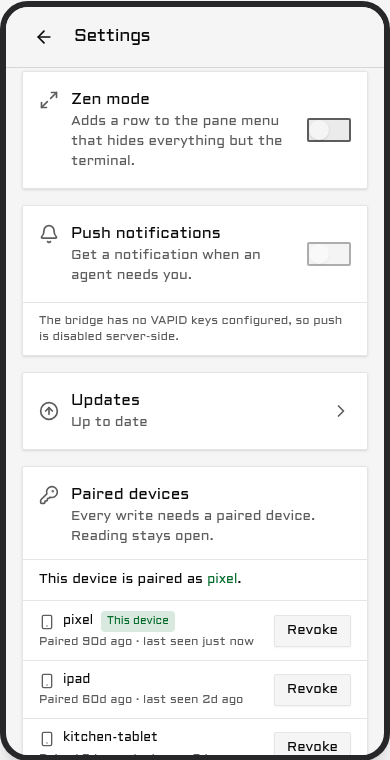
Open Settings and select Updates. The card displays the running version, the newest release, and the intermediate versions included in the update. If the host is on the newest release, the card says so and offers nothing.
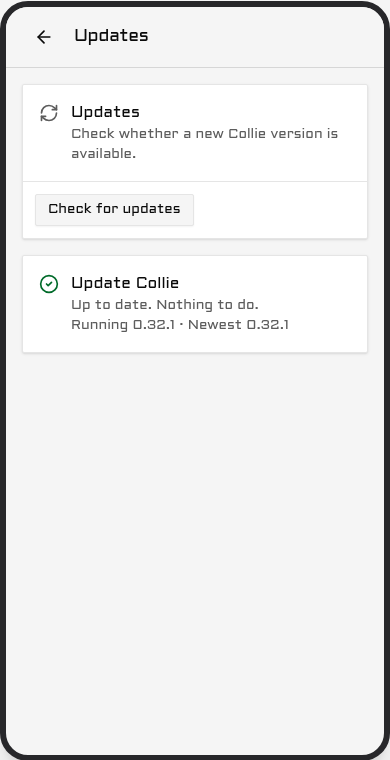
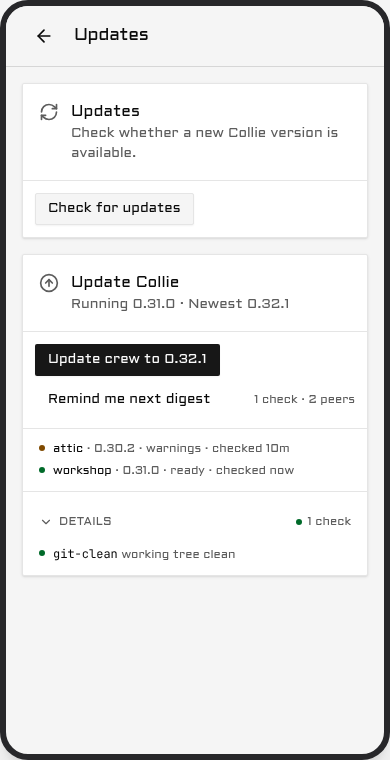
Under that sits the preflight, one line per check: doctor, disk, bun, tree, upstream and service. On a lead, every crew member is checked too.
- Green is clear.
- Amber is worth knowing and never blocks: version skew across a crew, an unusual install kind, a major that is out but is not being taken. Untracked scratch files in a checkout stay green.
- Red blocks the update. The line names the reason, such as a red
collie doctor, less than 1 GB free for the staged build, nobunon the host, or an upstream that cannot be reached. Where one command clears it, the card prints that command asFix: <command>.
Tapping Update to <version> asks once, and the confirm text is literal: your terminal session stays alive, and the phone view drops for up to 30 seconds. The restart takes the bridge down, not your multiplexer, so the agents keep running and the phone comes back on the new version. A major never rides a routine update: crossing one asks its own confirm, names the version as a new major, and tells you to read the release notes first.
While it runs, a sheet takes the screen. See What the phone shows while an update runs below. The card on the Updates page carries the same states in more detail:
| State | What it means |
|---|---|
preflight | Checking this machine. Nothing has moved. |
staging | Building or downloading the new version beside the old one. |
restarting | The bridge is down on purpose. This is not an outage. |
verifying | Waiting for the new version to answer. |
done | The new version answered. |
rolled-back | The new version did not answer, so the updater put the old one back. |
stuck | Neither version answered. Nothing will restart again on its own. |
interrupted | The run stopped before it finished. Nothing is half installed. |
The first four are progress; the card says so and asks you to keep the screen open. rolled-back names the version you are still on, shows the tail of the service log, and offers Retry. stuck prints the one command to run in a terminal. interrupted offers Retry as well.
Remind me next digest dismisses the card's nudge. It is not a mute: the next push waits for both a newer release and a fresh window.
How often you are told. Update pushes are a digest, at most one a day, and never before 09:00 host local time. A delta that is only patch releases waits for a weekly window instead, so a patch train arrives as one push rather than four; a minor or a major keeps the daily cadence and carries the waiting patches with it. Held releases are folded, never dropped. A patch can also ask for the daily cadence: a fix you must take today is marked urgent when it is cut, and the update card then shows an Urgent label with the one sentence saying why. You are told at the release, or at the next 09:00 after it. One urgent release makes the whole waiting train daily, and the version is still an ordinary patch. An install that predates this feature keeps the weekly window for an urgent patch until it has updated once. The card always shows the current state regardless of the window. The updates notification preference, under Settings → notifications (Web Push), is the single off switch.
On a crew lead, the button shows Update crew to <version>, and one confirmation applies to every machine. The lead updates first, under its own health gate. Each peer then levels itself to the same release, one at a time, using its own preflight, its own health gate and its own rollback. There is no per-peer button and no second confirmation prompt. For details, the two recovery paths, and the one case the phone cannot fix, see Updating the rest of the crew.
A band across the top of every screen carries what is standing rather than what is running: the release on offer, a peer that could not update, and New version — tap to update when the app in your hand is behind the bridge. A running update is the sheet's, not the band's.

What the phone shows while an update runs
A sheet takes the screen on the device that tapped the confirm, and every other device gets a badge.
The sheet carries one row per machine, the lead first, each with its version and the state it is in. Under those sits this device's own row, which is about the app in your hand and not about a machine: once the bridge serves the new version, the phone fetches that app in the background and the row counts the files as they arrive. The sheet also says once, in small type, that the update runs on the machines and that closing the app does not stop it.
The device that started the run cannot use the app behind the sheet. Nothing else is blocked: a second phone or a tablet shows one line it can tap to open, and closes again.
When every machine is done and the phone is running the new app, the sheet closes itself and a short message names the version. On a crew it reads Crew updated to <version>; on one machine it names that machine instead.
A run that updates only the members, such as Retry crew update, takes the screen the same way. The lead's row reads already up to date, because the lead is not part of that run and does not restart. The end reads Members updated to <version>, and a member that could not update leaves the sheet open on the phone that started the run, with its reason.
Three states can stall, and each one has a way out. None of them cancels the update, and none of them reloads the app.
| What you see | What it means | What to do |
|---|---|---|
last seen <time> ago on a machine | That machine has stopped answering the lead. | See Updates for the reason, or leave it. |
| Still downloading. Keep using the app you have… | The phone's own download has made no progress for two minutes. | Keep using the app. The download carries on. |
| Still working. Nothing is wrong yet… | The run has held one state for three minutes. | Keep waiting. The run carries on. |
Note. "Still downloading, keep using the app" is about the app on your phone and never about the machine. The machines have finished; only the new app has not arrived yet. The app you are holding keeps working, and it switches over on its own the moment the download lands.
From the terminal
collie update --check            # read-only preflight, --json for a script
collie update --check --local    # the same, this instance only, no crew members
collie update                    # stage, flip, restart, verify
collie update --status           # what the updater did, or is doing, --json for a script
collie update --rollback         # put the previous version back
collie update --major            # cross one major, see below
collie update --help prints the usage and starts nothing. Every collie command answers -h and --help the same way, before it does any work.
On a Herdr-managed install the same verbs are Herdr actions:
herdr plugin action invoke update --plugin herdr.collie      # Herdr-managed
bin/collie update                                            # Standalone
collie update --check changes nothing. It runs collie doctor, reads the free space, the bun version, the working tree, the upstream release list and the service unit, and on a lead it asks every crew member the same question over your own SSH. It exits 0 unless something is red, and --json prints a versioned report. Add --local to check this instance only and skip the crew members. The phone runs that local check on its own host and reads each peer's line over the crew link, so its preflight needs no SSH.
collie update fetches the newest release of your current major and stages it. The command then hands the swap to a separate updater and exits, because the restart kills the bridge that asked for the update. That updater points current at the new version, restarts through the new binary, and polls GET /api/health for up to 30 seconds for an answer carrying the version it just installed. If the answer does not come, or comes from the old version, it flips current back and restarts once more, and records rolled-back with a tail of the service log. If that does not come up either, it records stuck with the command to run by hand, and nothing restarts again. It rolls back once, never twice.
Set COLLIE_UPDATE_HEALTH_TIMEOUT_MS if 30 seconds is not enough on your machine. A slow cold start that runs past the budget is read as a failed update and rolled back.
collie update --status prints the record the updater keeps, and the phone reads the same record. A deputy's standby door serves it at /standby/update while the main port is down.
If a new beacon hook event is available, update prints a notice to re-run hooks install claude.
After each successful update, rollback or switch, the new build runs collie skill sync. It installs the walky talky skill into every agent harness on this machine and updates a copy that is behind, so your agents know the build you now run. It prints one line per file it changed, and it never fails the update: if it cannot run, update prints one note and you run collie skill sync by hand. It leaves out a harness where you ran collie skill uninstall. Set COLLIE_SKILL_SYNC=off to keep your instruction files as they are; the update then prints only a note when the skill is behind (Install the skill).
Where the versions live
A binary install and a linked clone share one layout under the install root (~/.local/share/collie or $COLLIE_DIR for a binary install, the clone itself for a checkout):
current -> versions/v1.3.0
versions/v1.3.0/
versions/v1.2.0/
On a checkout each versions/vX.Y.Z is a git worktree of the release tag, sharing the one .git, so a version costs a tree and not a second object store. The build runs inside the new directory and writes a completeness marker last; the flip refuses without that marker, so a killed build leaves the live version untouched. Going live is one rename of the current symlink. Retention keeps current plus the two newest previous versions, and only a successful run prunes, so a run that may need its rollback target never removes it.
A Herdr-managed checkout is the exception and keeps advancing in place (ADR 0006, amended 2026-09-03). It is detached and shallow, and it lives in a directory Herdr owns, so there is no versions/ layout beside it, nothing to hand off, and nothing to flip back to. --rollback is refused there; the recovery path is a reinstall of a named tag (herdr plugin install AltanS/collie --ref vX.Y.Z --yes).
Rolling back from 1.8.0 to 1.7.0 needs two hand edits in the state directory. 1.8.0 renames the three state files on its first start, so ~/.local/state/collie/ now holds crew-trust.json, crew-ops.json and crew-runtime.json, and a 1.7.0 build reads only the old names. Rename all three back before you start the 1.7.0 build:
cd ~/.local/state/collie
mv crew-trust.json pack-trust.json
mv crew-ops.json pack-ops.json
mv crew-runtime.json pack-runtime.json
Then edit two key names inside pack-trust.json. 1.8.0 reads the crew block under either spelling and writes it back as "crew", with "crewId" inside it, where 1.7.0 wrote "pack" and "packId". A 1.7.0 build reads only its own spelling, so once 1.8.0 has written the store — which it does on any join, rotation, warrant refresh or removal — rename that block back to "pack" and its id field back to "packId". Nothing else inside the three files changed, and crew-ops.json and crew-runtime.json need no edit at all. If you would rather not touch the file, put back a copy of pack-trust.json taken before the update, or stay on 1.8.0: a 1.7.0 build that cannot read the trust store starts solo and enforces no roster.
Going the other way into 1.9.0 needs the same two edits, by hand. 1.8.x renamed the three files for you on its first start; 1.9.0 does not rename anything. So a state directory that never saw 1.8.x still holds the 1.7.0 names, and a 1.9.0 build reads only the crew names. It says so at start, names both edits, and stays solo rather than adopting the directory. Do them before you start it:
cd ~/.local/state/collie
mv pack-trust.json crew-trust.json
mv pack-ops.json crew-ops.json
mv pack-runtime.json crew-runtime.json
Then rename two key names inside crew-trust.json: the block "pack" becomes "crew", and every "packId" inside it becomes "crewId". Nothing else in the three files changes. A file left under the old name costs no data, it only costs the crew: that collie comes up solo until the rename.
Verify
bin/collie update --status
herdr plugin action invoke version --plugin herdr.collie
bin/collie version
Expect the newest tag.
The phone's own bundle is a separate thing. The PWA checks for a new build by itself and reloads within about a minute, and it holds that reload for the length of an update run. If you are mid-task it shows a "tap to update" banner and waits for your tap.
On Windows
A source checkout never updates itself on Windows; a zip install does. collie update and the phone's Update button say so in one sentence on a source checkout and change nothing. Moving to the zip install is a one-time manual step:
collie uninstall
powershell -ExecutionPolicy Bypass -File .\install.ps1
After that, collie update works from the terminal and from the phone. That chain was rehearsed on a Windows 11 VM against a local copy of the release files, and the move itself was not. Releases up to and including v1.15.0 also could not swap a running collie.exe. See Collie on Windows.
If the version did not move
collie update asks GitHub directly on every run, git ls-remote for a checkout, the GitHub tags API for a binary install. It does not cache the release list. A release published seconds ago may still take a minute to show up, because GitHub itself needs a moment to catch up. Run collie doctor next. If that does not explain it, see When collie will not run.
If GitHub rate-limits the release check
collie update on a binary install lists the releases through GitHub's API, and so do the phone's update banner and install.sh. GitHub allows an anonymous caller 60 API calls an hour, counted per network address, so every machine behind one router shares that budget. When it is spent, the check fails closed and changes nothing:
error: GitHub rate-limited the release check (HTTP 403). Wait an hour, or set GH_TOKEN
       to a GitHub token with no scopes, so the limit is yours (docs/upgrading.md).
       Nothing was changed.
A token makes the limit your own. Collie reads one from the environment and never asks for one:
| Name | Who sets it |
|---|---|
COLLIE_GITHUB_TOKEN | you, for the service: the instance's .env, or github_token under [update] in config.toml |
GH_TOKEN | the gh CLI's own name |
GITHUB_TOKEN | GitHub Actions |
The first one set wins. The tag list is public, so the token needs no permissions at all: a fine-grained personal access token with repository access set to Public repositories (read-only) and no permission selected, or a classic token with no scope ticked. Do not use a token that can write anything.
For one run in a terminal, borrow the gh CLI's credential. The value never lands on the command line or in the shell history:
GH_TOKEN=$(gh auth token) collie updateFor the service, put it in the instance .env, which Collie holds at mode 600, or in config.toml under [update], and restart: the bridge reads the token when it starts, so the phone's banner uses a new or changed token only after collie restart. collie config shows it as set or unset and never prints the value. The token goes to api.github.com alone: the release download comes from github.com, which has no such limit, and never carries it. A message that mentions the token names the variable it came from, never the value. A token GitHub refuses fails the check with HTTP 401 and that name, so a wrong token is not mistaken for a rate limit. The bridge says the same once in its log and then keeps the last release it saw, so a banner that stops moving after a token expired is that log line; collie update --check names it any time you ask.
collie update --check reports the same three cases under upstream. A checkout lists the tags with git ls-remote instead, which the API limit does not count. In a crew, every machine reads its own token: a member updates by running its own collie update, from its own .env.
Cross a major
update never crosses a major version automatically.
herdr plugin action invoke update-major --plugin herdr.collie     # Herdr-managed
bin/collie update --major                                         # Standalone
This advances one major version to its newest strict release. It does not target prereleases (ADR 0020). See also: Upgrading from 0.x to 1.0.
If that fails with "You are not currently on a branch"
Installs from GitHub prior to 0.23.1 lack a branch tracking ref (#63). Reinstall to restore update functionality:
# replaces the checkout, rebuilds the UI
herdr plugin install AltanS/collie --yes
# reinstall doesn't restart the service
herdr plugin action invoke restart --plugin herdr.collie
# expect 0.23.1 or newer
herdr plugin action invoke version --plugin herdr.collie
Your config in Herdr's plugin config dir, ~/.config/herdr/plugins/config/herdr.collie by convention, is preserved.
Updating the rest of the crew
collie crew update <member>…      # on the lead
collie crew update --all
That is the terminal path, for a peer the phone cannot level. From the phone, update the whole crew with one tap and one confirmation: open Settings → System → Updates on the lead and select Update crew to <version>. The preflight above the button covers every member, not just the lead. If a check is red anywhere, the button is disabled and names the failing machine and the reason.
The lead updates first, under its own health gate. Only once it has settled does the first peer start. From 1.7.0 that order also matters for the words: a lead older than 1.7.0 reads a member's status by its first printed line, and a 1.7.0 member prints crew … where a 1.6.0 one printed pack …, so an un-updated lead cannot read it. A 1.7.0 lead reads both. Each peer then levels itself: it reads the release its lead is running, fetches that exact tag from GitHub, and runs its own preflight, its own health gate and its own rollback. Peers move one at a time. The Updates page keeps a line per member: waiting, checking, staging, restarting, verifying, updated, rolled back or unreachable.
A member updates itself at most once an hour. A member that updated within the hour, for example by hand, waits with rate-limited, retries in about N min under its line, and the run goes on once that time passes. If the lead's own update rolls back, the members are not touched, and their lines say so. A new update waits until the crew run has finished, 2 hours at most.
1.7.0 to 1.8.0. Lead first again, for a second reason: 1.8.0 renames the wire paths, the two environment keys, the three state files and the journal prefix to crew. A 1.8.0 lead answers the old /pack/v1/* paths for one release, so a member still on 1.7.0 follows the roll over the link it already has. Both old spellings go away in 1.9.0. The names and what each one does on your machine are in Updating to 1.9.0 from 1.7.0 or 1.8.x. Bring every member to 1.8.x before you move the lead to 1.9.0: 1.9.0 answers the old paths with nothing, and a member still on 1.7.0 then shows red on the lead's preflight, naming both versions and the command to run on that machine. The collie-release.json asset the release publishes feeds the wording of that notice on the band, on the Updates card and in the daily push, and it never changes what an update does. It also tells the check that a release is out: a tag whose asset still answers 404 is not offered, and the next check asks again.
Two requirements decide whether a peer can follow at all:
- A peer needs outbound HTTPS to
github.com. That is where its code comes from. Without that access, the peer is reported as behind and is levelled from the terminal instead, using the command above. - A
-dev+build never follows. A machine on a development build stays on it, whatever its lead is running.
A peer that rolls back says so on the Updates page and does not retry on its own. Two paths give it another attempt:
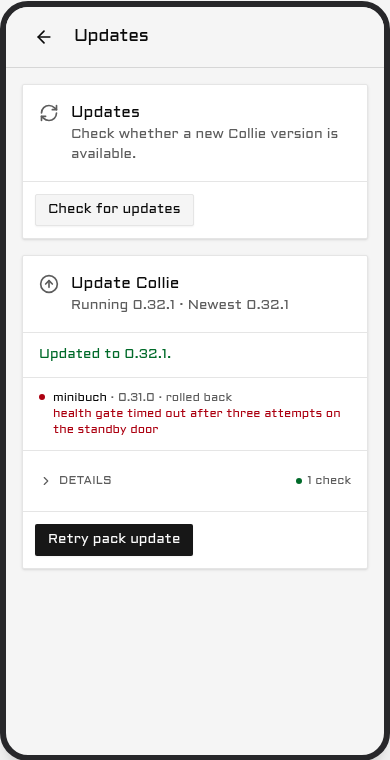
- From the phone. Once the lead is current and a peer is behind, the button reads Retry crew update. It starts a new run whose only legs are the peers, and that new run is what grants each of them one more attempt.
- From the terminal, on the lead. Use this for a peer the phone cannot level at all. The command is unchanged:
collie crew update <member>…      # on the lead
collie crew update --all
Running it on the lead is one sequence over your own SSH. It preflights every machine first, and prints each peer's own report beside the answer it gets over SSH, so a disagreement is explicit rather than averaged. It asks for one consent. It then updates the lead itself, if the lead is not yet running the build it is handing out. Next it takes each peer in turn: the peer is pushed the lead's commit as a git bundle, rebuilt, restarted, and polled until it answers the new build within the same 30 second budget. A lead with no git checkout, from the standalone install or from a package, has no commit to push, so it installs the release it runs itself on each peer instead, over the same ssh and pinned to that tag; a peer running from a git checkout is then skipped, with collie update --to-tag v<version> named on its row.
The first failure stops the run. Every member after it is left untouched and reported as "not attempted", and the summary names the one command that clears the failure. A lead that cannot take its own update touches no peer at all. Stopping there is safe, because a crew tolerates version skew (CREW_PROTOCOL.md §7.1), so a half-updated crew is a supported state and pressing on is not.
One case the phone cannot fix. If you roll the lead back by hand, with git or by copying files, after its peers have levelled, the peers are left ahead of their lead. Collie did not see the rollback, so no member steps down. A rollback made with the phone's Roll back or with collie update --rollback, and a switch back to Stable, do step the members down. See "The crew follows the lead" under Release lines. Those two runs are the only ones that move a member to a lower version, because a lead that could move a peer backwards at will could move it anywhere. The skew from a hand rollback is harmless, and the remedy is collie crew update <member> on the lead.
Code reaches a peer over your SSH and never over the crew link (ADR 0016, addendum 2026-09-04). When a peer levels itself, its code comes from GitHub over anonymous HTTPS and the peer decides for itself. The lead states only the version it is running and which peer may proceed.
If the updater itself dies
Nothing above helps when the updater is gone. This is the path that assumes only a terminal.
The updater writes one record, <state dir>/update.json (by default ~/.local/state/collie/update.json, or under $COLLIE_STATE_DIR). Read it first: it names the state, the version the run came from, the version it was going to, the updater's pid, and on a failure a tail of the service log and the recovery command.
An update the phone started does not print to your terminal at all. On Linux with a systemd user manager it runs under a transient unit of its own, named collie-api-update-<stamp>, and --collect removes that unit as soon as it exits, so its transcript is only in the journal:
journalctl --user -u 'collie-api-update-*' --since '30 min ago'Everywhere else, macOS included, the updater's own output goes to a file in the state directory:
cat ~/.local/state/collie/update-runner.logEach update the phone starts empties that file and keeps the run before it as update-runner.log.1. On the systemd tier the file holds only the one line systemd-run prints, and the journal above has the rest.
A crew member can stay on the old version after a crew update. Its checkout then shows the new tag, but /standby/health or the footer still shows the old build. Check that no updater runs, with systemctl --user list-units 'collie-api-update-*'. If none runs, run collie update on that machine. It rebuilds a checkout whose build did not finish.
A run that gives up before the switch, a new version that will not start on this machine for instance, changes nothing on disk. The phone that started it says that the update failed on that machine and gives the reason, and the same reason is the reason field of update.json.
That is where to look when the phone reported success and something downstream did not happen — a warning that the run record could not be written, for instance, which is a lead that updated itself and will not level its crew. The bridge's own journal carries the other half: one [crew] update <run id>: levelling peers to <version> line per run, when the lead picks the record up. Before 1.8.0 that prefix was [pack]. No such line, and the turns never started.
A pre-1.5.4 update stuck at bunx
Before version 1.5.4, updates started from a phone run in a transient systemd user unit that lacks your PATH. When Bun lives only in ~/.bun/bin on a checkout install, the checkout advances, but the rebuild fails with bunx: command not found. Fix this by running collie update once from a terminal where Bun is on PATH, or run the Herdr action, whose shim locates Bun itself. Either method rebuilds the advanced checkout. Starting in 1.5.4, the updater finds Bun on its own.
Beside it sits <state dir>/update.lock, holding a pid and a timestamp. One run at a time. A record that still reads preflight, staging, restarting or verifying, has not moved for 10 minutes, and whose pid is no longer in the process table, is over: it reads as interrupted, and a new run may take the lock.
To put the previous version back by hand, point current at it and restart:
cd ~/.local/share/collie        # or $COLLIE_DIR, or the checkout root
ls versions/
ln -sfn versions/<previous> current
collie restart
Or let the previous version do the same thing for you, which is the command a stuck record carries:
~/.local/share/collie/versions/<previous>/bin/collie update --rollbackUse the full path, not collie: the name on your PATH resolves through current, and current is the thing that may be wrong.
What the health gate does not catch
The gate proves one thing: the service came back and answered /api/health with the version that was installed. That is a bounded promise, not "never brick". Four things can be broken while the gate reports success:
- A stale web bundle on the phone. The host is on the new version and the phone is still running old JavaScript out of its service worker. The PWA replaces its own bundle on its own schedule; the health gate has no view of it.
- Config or schema migrations. Collie ships none at this cadence, and the updater runs none. The gate checks that the service answers, not that its data is shaped right.
- A mux driver that breaks only on interaction. The bridge starts and answers health while the adapter fails on the first real attach or send. Health is a liveness probe, not a conformance run.
- The updater running the old version's code. The detached updater is launched from the version being replaced. It is kept small and stable and its record is versioned, so an old updater and a new bridge still understand each other, but that is a mitigation and not a guarantee.
Resolving the newest release from a script
Query git tags and sort by semver. Avoid GET /repos/AltanS/collie/releases/latest, which excludes prereleases.
# newest stable release
git ls-remote --tags --refs https://github.com/AltanS/collie | \
  sed 's#.*refs/tags/##' | grep -E '^v[0-9]+\.[0-9]+\.[0-9]+$' | sort -V | tail -1
Release lines
Each machine is on one of two release lines. The default is Stable.
- Stable takes final releases only, for example
1.23.0. - Edge also takes Edge builds, for example
1.23.0-edge.2. An Edge build is a GitHub pre-release, cut from the same tree a few days before the final release. It reaches volunteers first, so a regression is found before it reaches everybody.
Set the line on the phone: Settings → Updates → Release line. The switch installs nothing. It saves the line and shows a receipt. The Updates card then offers what the new line offers, through the normal update screen.
- On Edge, the offer is the newest build above the one you run, Edge builds and final releases together, in the same major. A final release replaces its own Edge builds on both lines.
- A build this machine rolled back from is never offered again, on either line.
- On Edge, the push about a new build goes out at the next check, not in the next digest. It still waits until 09:00 local time. Stable keeps the digest windows.
What rhythm to expect on Edge. Expect about one Edge build a day at most, and each one carries a change you can see. The bridge checks for new builds every six hours. You get one push per build, and never before 09:00 host local time. When one check finds several new builds, they fold into one push. The update strip asks once per build, and you may skip a build: the next update takes the newest one. Dismissing the strip counts for that version only, so the next build asks again.
Back to Stable. Switch to Stable on a machine that runs an Edge build, and the page shows one of three cases:
- A final release at or above your build is out. The Updates card offers it as a normal update.
- Your Edge build is ahead of every final release. The page offers two choices: - Go back now installs the newest final release below your build, behind a confirm. It uses the Stable build this machine kept, when there is one, and downloads it when there is not. If a state file in your build cannot be read by that release, the page names the file before the button. - Wait for Stable keeps your build. No more Edge builds are offered, and the next final release is offered the day it is out.
- You already run a final release. There is nothing to do.
Kept builds. While a machine is on Edge, it keeps the live build, the previous build, and the last Stable build. The last Stable build is not pruned until the machine is back on Stable, so "Go back now" is a switch and not a download.
Roll back. A rollback off an Edge build puts the machine on Stable and marks that build as rolled back from. This is true for Roll back on the phone and for collie update --rollback. An Edge build that fails its own health check is rolled back by the updater and marked the same way, so it is not offered again. The line stays Edge, and the next Edge build is offered as usual.
The crew follows the lead. The lead's line is the crew's line. A member follows its lead to an Edge build when the lead is on Edge, and takes the lead's line for its own. A member steps down only when the lead rolled back or went back to Stable. Those are the only two cases where a member installs a lower version. The Crew page shows the line the members follow.
From the terminal. The phone is where the line is set. Two flags exist for one run each:
collie update --line edge                     # resolve this one run on Edge; the saved line stays
collie update --to-tag v1.22.6 --downgrade    # go down to a lower final release
--to-tag never takes a lower tag without --downgrade. It takes a higher Edge tag only on a machine on Edge. On a Herdr-managed install, both lines and the way back go through the same in-place update: the updater checks out the tag and writes the Edge suffix into the version files itself.
Prereleases
Stable installs do not receive prereleases. Edge builds are the exception, on the Edge line (see Release lines). Opting into a prerelease tracks that major's prereleases until the final release arrives (ADR 0020):
# Standalone — the install script's opt-in flag takes the newest prerelease
curl -fsSL https://colliepwa.dev/install.sh | sh -s -- --beta

# Herdr-managed — install the tag; that is the whole opt-in
herdr plugin install AltanS/collie --ref <tag> --yes
# a reinstall does not restart the service
herdr plugin action invoke restart --plugin herdr.collie
Resolve <tag> using Resolving the newest release from a script.
To return to stable releases:
herdr plugin install AltanS/collie --yes
herdr plugin action invoke restart --plugin herdr.collie
Upgrading to 1.24.0
Version 1.24.0 adds usage dots, a Stop button and a large-screen layout. If you come from 1.23.4, nothing needs doing on upgrade day. What you will notice:
- Collie leaves your statusLine alone. Wrapping it is opt-in with
collie hooks install claude --statusline. If you took the wrap from an Edge build and want it gone, runcollie hooks uninstall claude, thencollie hooks install claude(Collie writes hooks into Claude's own settings). - The context dot needs no new hook. The hooks that 1.23.4 installed already include
SessionStart, and they run the same command. The new Collie reads the session file with them. If you never rancollie hooks install claude, run it once. A Claude session that is already running shows no dot until it starts again, resumes, clears or compacts, because the window size comes from the session start. - The 5-hour and 7-day dots read your own logins. For Claude, Collie reads the login file on this machine and asks
api.anthropic.com. For Codex, it reads Codex's session files and asks nobody. Both are on by default. SetCOLLIE_ACCOUNT_WINDOWS=0in your.env, oraccount_windows = falseunder[bridge], to turn them off. OpenCode Go and Grok stay off until you name them (Usage windows). - A Stop button, a Clear button and Steer. Stop takes two taps and presses the agent's own stop key (Stop a turn). Clear empties the input box, and Restore types the text back for two minutes (Clear the box). Hold Send to steer a running turn on pi, Codex and OMP (Steer or queue).
- A theme that sets
pane-activeis version 3. A Collie older than 1.24.0 refuses that file with a message that names the version. The other themes keep their version (Versions). - A wide screen shows a sidebar. From 600px wide and 480px tall, the pane screen shows several panes side by side. To keep the phone layout on one device, set Large-screen layout to Off in Settings.
Upgrading to 1.19.0
Version 1.19.0 moves starting things to one page and lets each phone shape its own Keys and launchers. Nothing needs doing on upgrade day. What you will notice:
- The New sheet is a page. + New on the dashboard opens
/new, with the machine, an Agent or Command select, the folder and a New worktree switch. The new-space sheet, its space label and its list of existing worktrees are gone. Open an existing worktree withherdr worktree openon the machine (Start an agent or a shell from the phone). - A crew member must update to start agents by name. The page lists a member that runs an older Collie, with its choices disabled. Update the lead first, and the members follow (Starting something on a machine).
- Phones may add launchers. With the default
[phone] adds = true, a paired phone can add up to 20 rows to a machine, kept inlaunchers-added.json. Setadds = falseinlaunchers.tomlto turn that off (Launchers added from a phone). - The Keys pad is a board. It starts as the pad you had, and each browser keeps its own arrangement (Your own key pad). Presets in
keys.tomlare unchanged. - A bare folder name is a folder under home.
projectsin the Folder field now means~/projects, and a folder that is not there is refused with a notice.
Upgrading to 1.18.0
Version 1.18.0 makes pairing mandatory for reads as well as writes (ADR 0086). What changes on upgrade day:
- Paired phones keep working. Their stored token already satisfies the new rule. Nothing to do.
- Unpaired browsers see the pair screen. A desktop browser that never paired, which could read before, now gets
403 device not paired. Runcollie pairon the host, then enter the code in Settings on that browser (Pair a device). - An installed app can keep the old screens for one more load. An installed app may still show the previous version's screens until it loads once more. If it shows "Sign in" after the update to 1.18 or later, reload the app, or close and reopen it. Then pair it as above.
- Scripts must pair once. A script that read the API without a token gets
403now. Runcollie pair --expires 30d, then claim the code with a POST to/api/pairthat carries{"code": "...", "label": "script"}and a same-originOriginheader. The token comes back once, in that answer. Send it asAuthorization: Bearer <token>on every later call. Store it like a password. - Host CLIs need nothing.
collie doctor,collie historyand the crew update sweep read their own bridge with a local credential the bridge writes to the state directory. - Rolling back below 1.18.0 ignores token expiries. An older bridge does not know the
expiresAtfield, so an expired device works again until the bridge is updated. Revoke it withcollie devices revoke <label>if that matters (Give a device an expiry). - Old audit files may hold typed characters. Files written before 1.18.0 can list characters typed on the phone. Rotate or delete
audit.logfiles from before the update. - Masking may get in the way. File bodies in Files and diffs in Changes now pass through the same secret mask as pane text. If it hides something you need, set
COLLIE_REDACT=offin your.envand restart (configure). - A 1.18.0 lead masks its members' text too. A member still on 1.17.x does not mask, so the lead masks that member's text before your phone gets it. To see a member's text unmasked, set
COLLIE_REDACT=offon the lead as well as on the member.
Upgrading from 0.x to 1.0
If BUN_INSTALL is defined only in .env, export it in your shell profile or service environment instead. Then run:
# Herdr-managed
herdr plugin action invoke update-major --plugin herdr.collie

# Linked clone
bin/collie update --major
Verify with bin/collie version or herdr plugin action invoke version --plugin herdr.collie.
For crew setups: Update the lead first, then run collie crew update <member>… (Updating the rest of the crew). Note:
joinrequires--insecurefor plainhttp://leads.- Pre-1.0 invite tokens must be regenerated with
crew invite. - Older member records require
reconnect.
What 1.0 changes for you
Herdr action IDs and scripts/collie-ctl.sh routes are unchanged (ADR 0006).
CLI verbs are compiled into <checkout>/bin/collie (Commands). Use bin/collie link to add collie to PATH (Put collie on your PATH, ADR 0021).
New features:
doctor: Configuration diagnostics.
Side by side, if the herd is real
Secondary instance configuration is documented in Multiple Collie instances on one host.
Rolling back
Check out the last 0.x tag and rebuild:
last0x=$(git ls-remote --tags --refs origin | sed 's#.*refs/tags/##' | \
  grep -E '^v0\.[0-9]+\.[0-9]+$' | sort -V | tail -1)
git fetch --depth 1 origin tag "$last0x"
git checkout --detach --force "$last0x"
rm -f bin/collie    # 1.0's binary otherwise survives the rollback
Rebuild with bash scripts/collie-ctl.sh build and invoke Herdr's restart action. State files (crew-trust.json, crew-runtime.json, paired-devices.json, pairing-pending.json) can remain. Rollback removes device pairing enforcement; configure COLLIE_DEVICE_HEADER if write protection is required.
Verify it worked
Check that version reports 1.0.0 or higher. An upgraded install pairs no devices automatically: run pair to issue a phone its write credential, and devices revoke if that phone is lost (Pair a device).
Stop or uninstall
Pause the service:
herdr plugin action invoke stop --plugin herdr.collie     # Herdr-managed
bin/collie stop                                           # standalone
Remove the service definition and port mappings (.env and checkouts are preserved):
herdr plugin action invoke uninstall --plugin herdr.collie   # Herdr-managed
bin/collie uninstall                                         # standalone
To delete the program and your own files too, follow the three steps under Install → Uninstall, which spells them out per install kind, packages included.
When collie will not run
For binary installs (~/.local/share/collie or $COLLIE_DIR), execute an older binary directly:
ls ~/.local/share/collie/versions/
~/.local/share/collie/versions/<previous>/bin/collie update --rollback
To install a specific version directly:
curl -fsSL https://colliepwa.dev/install.sh | COLLIE_TAG=v1.0.0 shFor checkouts or Herdr installs, run git checkout <tag> or herdr plugin install AltanS/collie --ref vX.Y.Z --yes.
You run a fork
collie update checks origin against COLLIE_UPDATE_REPO (default AltanS/collie) and aborts if they differ. Set COLLIE_UPDATE_REPO=you/collie if your fork releases its own tags.
To merge upstream updates into your fork manually:
git remote add upstream https://github.com/AltanS/collie.git
git fetch upstream --tags
git merge v1.0.0                                            # the tag you decided to take
# resolve the conflicts, commit the merge, then rebuild and restart:
bash scripts/collie-ctl.sh build
# Herdr-managed: invoke the `restart` action instead
bin/collie restart
Do not use update --major on a fork; merge the v1.* tag manually. Run collie doctor to check the active COLLIE_UPDATE_REPO.
Surviving reboots
On Linux, enable lingering for unattended user services:
loginctl enable-linger $USERVerify status with systemctl --user status collie.
On macOS, start manages ~/Library/LaunchAgents/herdr.collie.plist automatically. It runs at user login. Check status with launchctl print gui/$(id -u)/herdr.collie.