06/Documentation
Durable agents on the phone
What a durable agent's section, conversations, questions and receipts look like
Experimental. What a durable agent shows on the phone may change, or the feature may be removed, in a later minor release. Durable agents says what decides whether it stays.
This page shows every place a durable agent appears on your phone: its row on the dashboard, its list of conversations, its questions, the chat, its starters and its pushes. Durable agents attaches a durable agent first.
A durable agent draws a control only for what it said it can do in its hello. A row below that names a control assumes the durable agent declared it.
The Durable agents section on the dashboard
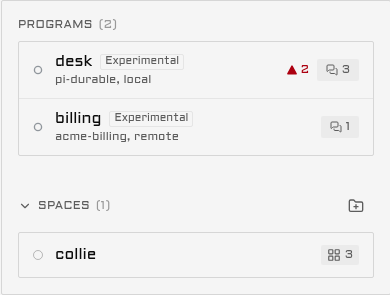
Each durable agent is one row in a Durable agents section, apart from your spaces.
| part of the row | what it shows |
|---|---|
| Line 1 | The durable agent's name from sources.json, and an Experimental badge |
| Line 2 | Its runtime, the name the durable agent gives itself in its hello, else durable. Then local or remote |
| Right edge, ready | The count of its open conversations, and in the needs-you colour the count that waits on you. The second count is hidden at zero |
| Right edge, not ready | The word Starting, Unreachable or Version mismatch, and no counts |
A durable agent reached over its socket, or over http://127.0.0.1 or http://localhost, is local. Every other URL is remote.
The section sits below your spaces. It moves above them while any durable agent has a conversation that waits on you, and back below when the last one is answered. With no durable agent attached, the section is not drawn at all.
With "Show only panes that need you" on, the section lists only the durable agents that wait on you. Tap a row in any state to open that durable agent's conversation list.
The conversation list
A durable agent's home lists its conversations the way a messaging app lists its chats.
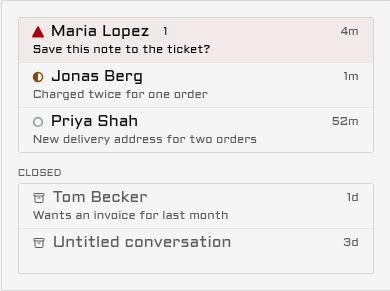
What waits on you comes first, then the other open conversations, newest first. The closed ones follow under the label Closed. Each row shows the title, its state mark, the time of its last activity, and one line under it: the question that waits, else the durable agent's subtitle. A waiting row also counts its open questions. A row with no title says "Untitled conversation".
Tap an open row to open it in Chat. Tap a closed row to read it, read-only. A closed conversation has a Reopen button when the durable agent can reopen one.
The open rows come from the dashboard's own data, so they draw at once. The closed ones come from the durable agent, which Collie asks once per visit and again when a conversation opens or closes, never on every poll.
| at the foot of the list | when |
|---|---|
| Load more | The durable agent has more than 100 conversations. Each tap reads the next 100 |
| "This durable agent does not keep a list of its conversations." | The durable agent answered that it keeps no list |
| "The durable agent did not answer. Try again in a moment." | The durable agent did not answer the read |
| "The durable agent speaks wire v2, this Collie speaks v1. Update Collie, or the agent's SDK." | Collie refused the durable agent for its wire version (Receipts) |
| "Couldn't load the conversations. Try again." | The read failed on the way |
A durable agent that keeps no history shows its open conversations alone, with no Closed group and no note. A list already drawn stays drawn when a later read fails.
A question on the phone
A durable agent's question is a card in the chat, under the tool call it is about.
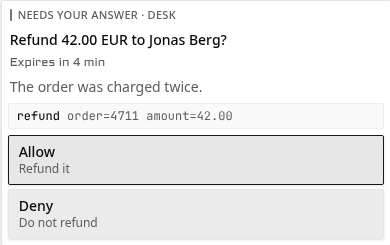
The caption names the durable agent, "Needs your answer · desk". When the durable agent set an expiry, the line under the title counts down: "Expires in 4 min", then "Expires in 40 s", then "Expired". Past the expiry the buttons stay, and the durable agent answers a late tap itself.
| kind | what the card shows | limits |
|---|---|---|
permission | One button per option, in Collie's words: Allow, Always allow, Deny or Cancel. The durable agent's own label is the quiet second line | Up to 6 options |
choice | One row per option. One tap sends the pick. With multiple, the rows toggle under "Pick any number" and Send sends the set | Up to 8 options |
text | One line to type in, a count such as "12 of 500", and Send | 500 characters, or the durable agent's limit up to 2000 |
form | Its fields stacked under one Send: a text line, a choice as a list to pick from, or a toggle. A required field says Required | Up to 6 fields |
"Always allow" needs two taps. The first changes the button to "Tap again to always allow" and the tool's name. The second sends it. Collie does not offer it when the question names no tool.
When Collie had to cut or clean the durable agent's words, the card says "Text shortened" and offers no "Always allow", because you were not shown the whole text.
A card of a kind this Collie does not know shows its words and says "This ask cannot be answered from the phone." A conversation draws its first 5 questions as cards, and a "Show N more" row opens the rest.
What happens after a tap
Every tap carries one request id, and only a tap sends an answer.
| what happened | what the card says | what to do |
|---|---|---|
| The durable agent took the answer | Nothing: the card closes | Nothing |
| The durable agent decided first | "Decided in the durable agent." | Nothing. The chat keeps a line for it |
| The question timed out first | "Timed out before an answer." | Nothing. The chat keeps a line for it |
| Another answer came first | "Already answered. This card goes away on the next update." | Nothing |
| The question was not open, and the durable agent did not say why | "Not taken. The question may show again in a moment." | Wait. A durable agent that restarted asks again |
| The question changed under you | "This ask changed. Read it again, then tap an answer." | Read the new form and tap again |
| The answer may not have arrived | "Not sure the answer arrived. Try again sends it once more." | Tap Try again. It sends the same request id, so the durable agent is told once |
| A retry found the question closed or changed | "May already be applied. Check the chat." | Check the chat |
| Collie refused the answer | Collie's reason, else "The answer was refused." | Read the reason |
| The durable agent's machine runs an older Collie | "This machine runs an older Collie and cannot take answers here. Update it, or answer in the durable agent." | Update that machine |
Receipts
Collie tells you how a question ended when you did not answer it, and why a durable agent is refused.
| case | what you see |
|---|---|
| The question has an expiry | The card shows the time left under its title |
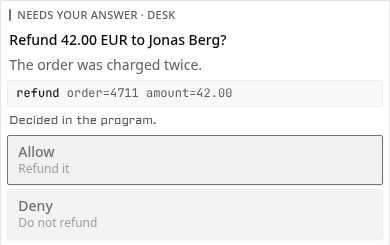
| You tapped after the durable agent decided, or after the expiry | The card freezes and says "Decided in the durable agent." or "Timed out before an answer." |
| A question timed out, or the durable agent decided it, with no tap from you | One line in the chat: "Timed out before an answer:" or "Decided in the durable agent:", then the question's title |
| Collie refused the durable agent for its wire version | A caution box on the durable agent's home, and the words Version mismatch on its dashboard row |
A question you answered from the phone, or one that ended because you stopped the turn, leaves no such line. Your tap already had its card.
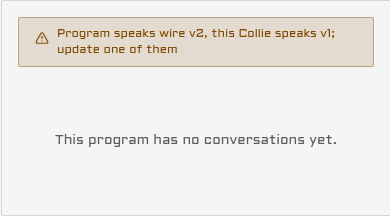
The caution box says which wire version each side speaks, for example "Program speaks wire v2, this Collie speaks v1. Update Collie, or the durable agent's SDK." Update the older side. Versions has the rule.
The chat
A durable agent's conversation opens in Chat, its only view.
| item from the durable agent | what Chat draws |
|---|---|
user | Your own line |
reply | The agent's answer |
thinking | The agent's thinking |
notice | A short note in the thread |
markdown | Rendered markdown: headings, lists, emphasis, code and links. Raw HTML shows as text |
code | A code block, with its language when the durable agent named one |
link | A link line with its label, else the address. Only https:// links |
tool | A tool call: running, done with its output, failed, or denied |
A reply, thinking, notice or markdown item that is still growing has a cursor at its end and no time. The cursor goes when the final text arrives. A turn you stopped leaves the note "stopped".
Your own line
Your line shows in the thread the moment you tap Send, with a small clock. When the durable agent's own copy arrives, it takes the line's place.
| state | what the line shows |
|---|---|
| Sending, or sent | The clock. The composer says "Sent" when the durable agent took it |
| The answer never came | "Sending, not confirmed". Send again retries with the same request id |
| Refused, or the turn moved on | "Not sent", and your words go back into the field |
A durable agent that does not echo the request id is matched by the same text within 30 seconds. A line the durable agent never writes back stops showing after 10 minutes.
While your line is the newest thing in the thread and the durable agent has not answered, a row of three dots says it is working.
The header
The header is two lines. Line 1 is the conversation's title and the Experimental badge.
| line 2 shows | when |
|---|---|
| "Step 2 of 3: Save a note" | The durable agent reports steps and one is running |
| "42%: uploading" | The durable agent reports a percent, with its label |
| The durable agent's subtitle | No progress, or every step is done |
| The workspace | The durable agent sets none of these |
Progress shows only while the conversation works or waits on you.
The belt
The belt holds Steer and Stop, then up to 4 buttons of the durable agent's own.
Steer sends your text into the running turn instead of starting a new one. Stop ends the running turn. A button that cannot act now is dimmed in place, so nothing moves.
| durable agent button | the rule |
|---|---|
| Label | 16 characters at most |
| Icon | One of 12: play, pause, check, x, refresh, archive, flag, star, send, note, search, more. Any other name draws no icon |
| Busy | A spinner, and no tap |
| Disabled | Dimmed, and no tap |
A tap names the newest turn the phone saw. When the conversation has moved on, nothing runs and the phone says so: "The conversation moved on, so the action did not run." Check it, then tap the button again if you still want it.
What a durable agent pane does not have
A durable agent has no screen, so its pane has no Terminal view, no tab or pane strips, and no Keys, Type or Quick button. Its menu has no History, Pane settings or Pin to top row. Close in the menu reads "Close conversation".
New conversation and starters
The New page of a durable agent is titled New conversation, and it lists the durable agent's starters.
A starter takes no folder and no text: the durable agent decides where it works. Tap one, and the durable agent opens a new conversation. The page offers no agent, shell or command of the machine. A durable agent with no starters says "This machine's durable agent offers no starters yet."
Push
A question can push to your phone, within caps for each durable agent.
| cap | limit | past it |
|---|---|---|
| One pane | 3 pushes a minute | The question shows on the phone and sends no push |
| One durable agent on one machine | 10 pushes a minute | The same |
| One durable agent on one machine | 30 pushes an hour | One push, "A durable agent on {host} is raising many asks", then no push from that durable agent for an hour |
The push says "Permission needed in" and the pane's name. A durable agent may add its own title, at most 60 characters, and a line, at most 120. Collie pushes a question once per machine, durable agent and tool call, so a question asked again after a restart shows and does not push. Pushes from a durable agent has the rest.
Masking
With secret masking on (COLLIE_REDACT, on by default), Collie masks secrets in the titles and subtitles of a durable agent's conversation list.
In a crew
The lead's dashboard has one Durable agents section for every machine of the crew. A member's durable agent adds the member's name to line 2, for example pi-durable, local, workshop, and the lead's own durable agents name no machine. A question on any machine moves the one section above the spaces. Durable agents in a crew says who answers for what.